For accountants and bookkeepers

Every client's books, from one sign-in.

See which client needs you first, review drafts before they post, correct mistakes with the history kept, and trace any report figure to its entries. Your clients keep their own books; your practice works in them.

Free. No card needed. Bringing a practice? Email support@qetaab.com.

Approvals
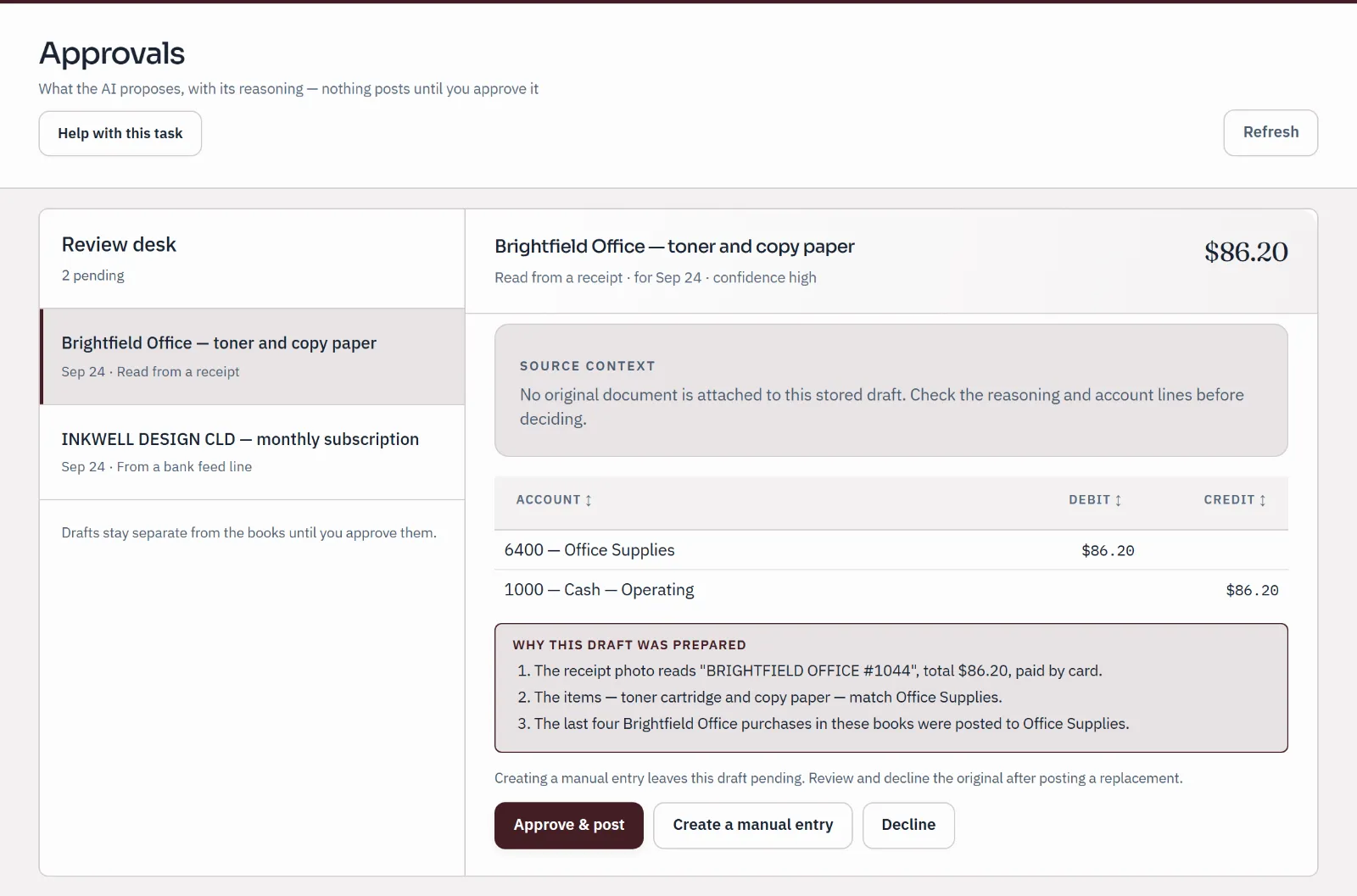
Approvals review desk: a draft prepared from a receipt, with its account lines and three reasons, waiting for a person to approve, change or decline. Nothing posts until approved.
Sample company · synthetic figures
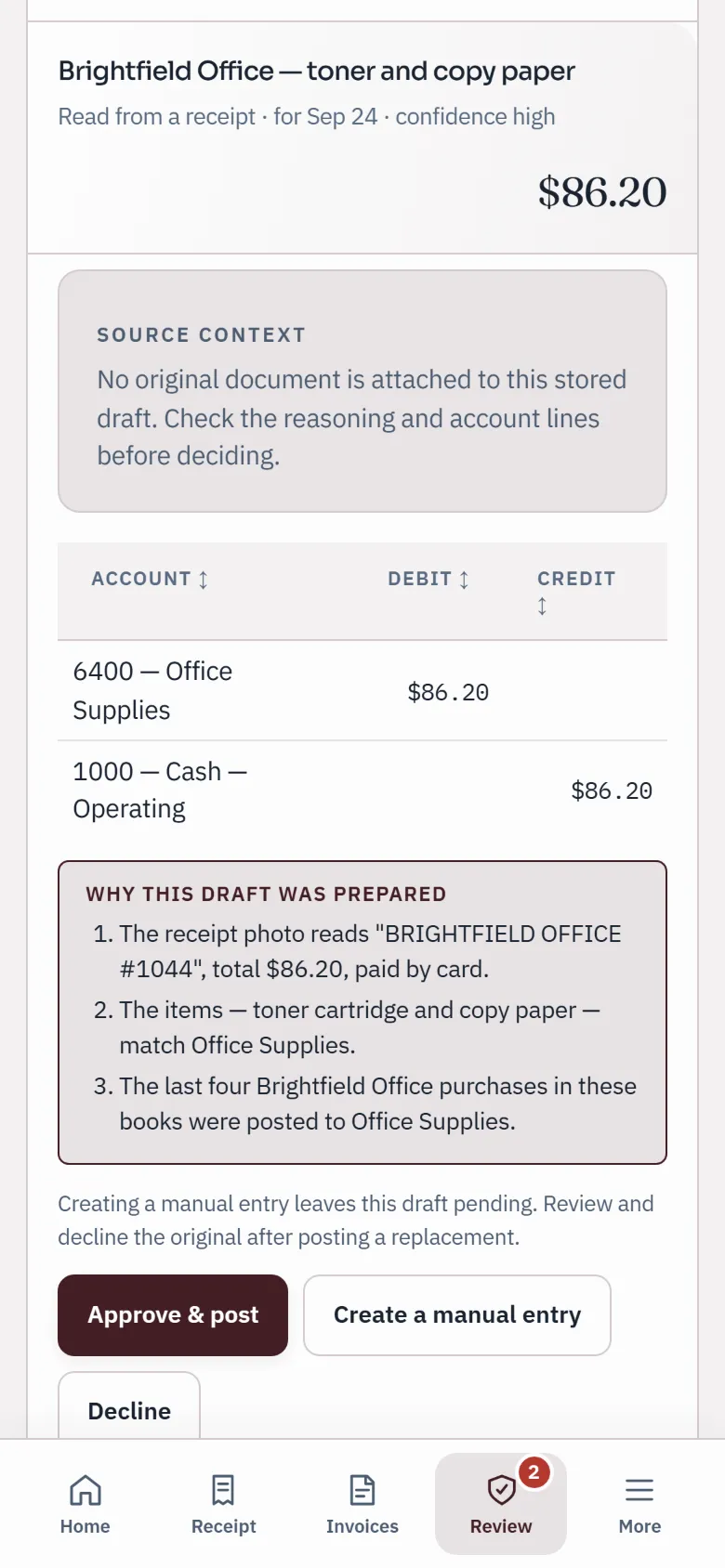
A draft prepared from a receipt on a phone, with its account lines, three reasons and Approve & post, Create a manual entry and Decline buttons.
Sample company · synthetic figures

What changes

One record, shared with the client.

  1. 01

    Work in the client's books, not a copy of them.

    The client invites your practice, or you open new books for them and they are invited as owner. Either way there is one record, and it belongs to the client.

  2. 02

    Suggestions wait for a person.

    Lines sent from a bank import, AI suggestions and requests from the business wait in Approvals until someone approves or declines them. Each draft shows why it was prepared.

  3. 03

    Corrections never erase history.

    Posted entries are never edited or deleted. Reverse an entry or move a line to the right account, and the original and the correction both stay on the record.

  4. 04

    Free for the whole practice.

    Keep any number of clients’ books, with your whole team, at no charge and with no card needed. A paid plan will add live bank feeds and AI, shared with the clients whose books you keep.

A week in the practice

From the first look to the locked month.

Real screens from a sample company. Each job links to the step-by-step guide.

Monday · All Books

Start with the client who needs you first

All Books lists every set of books you can open, your own and your clients', with failed checks, urgent deadlines and waiting drafts at the top. A calendar below it gathers the next dates from every client. Choose one and you are working in their books.

  • Find a client by name, or show client books only
  • Cash, what is waiting on you and the next deadline, per client
  • A score out of 100 from ledger checks, reconciliation and period locks (not an audit opinion)
How practice access works
Dashboard
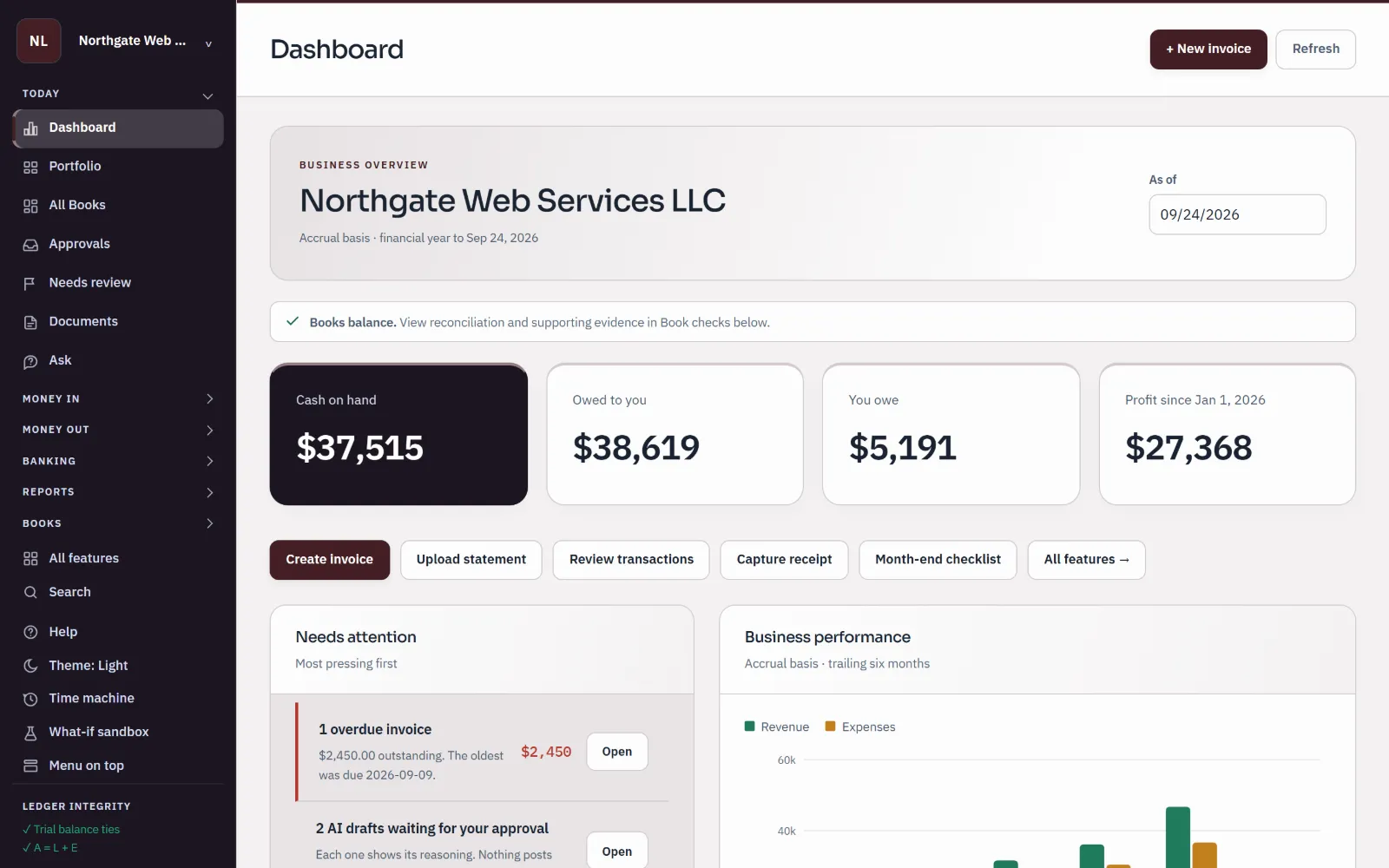
Sample books for Northgate Web Services LLC: the dashboard shows cash on hand, what customers owe, what the business owes, profit for the year and a list of things needing attention.
Sample company · synthetic figuresOne client's dashboard: cash, what is owed both ways, profit, and what needs attention first.

Tuesday · Questions

Ask in the books, not in an email thread

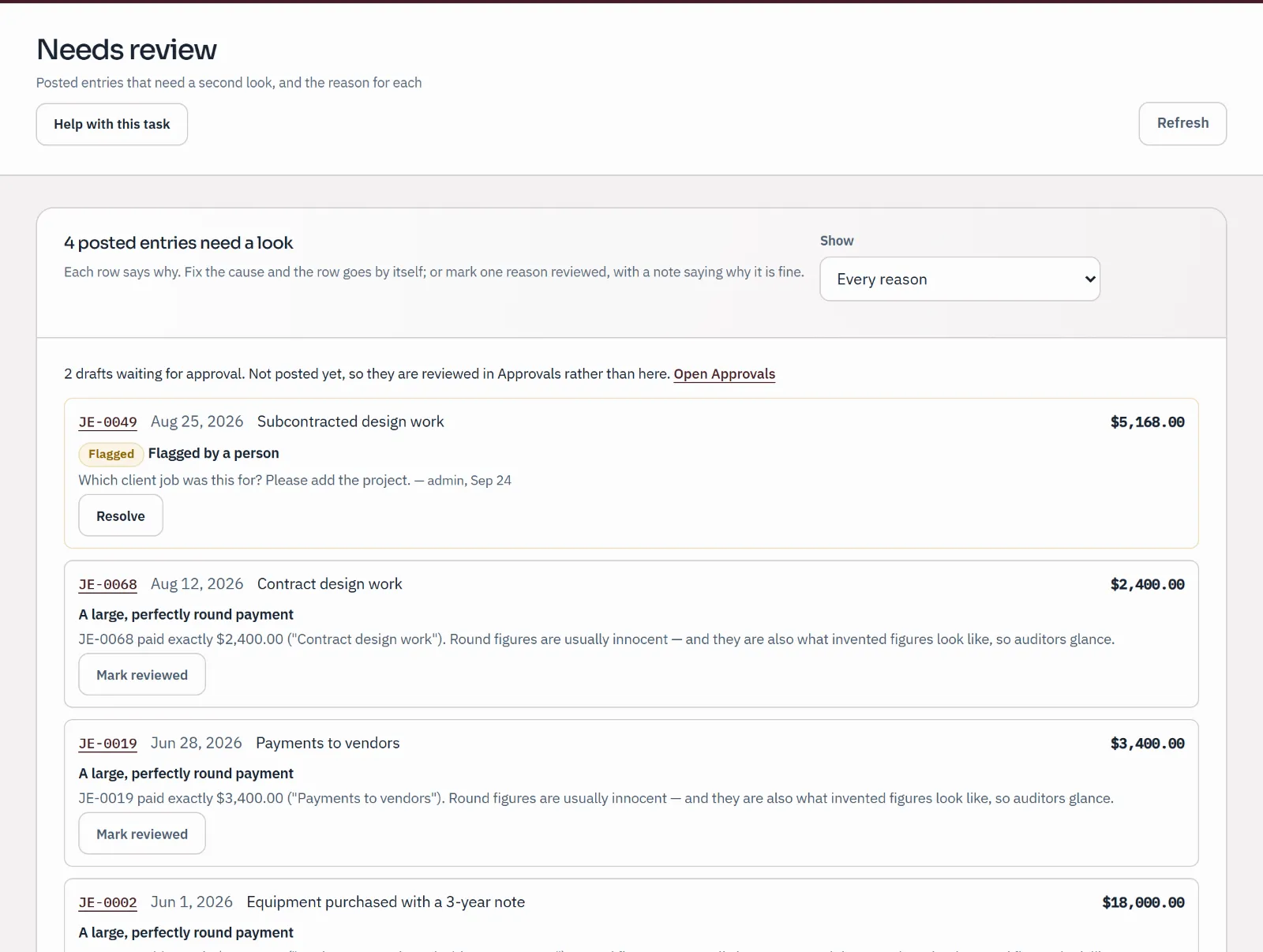
Flag a posted entry with your question and it waits in Needs review, showing who raised it and when, until someone resolves it. The same list raises what deserves a second look: entries still on a holding account, receivable or payable lines with no customer or vendor, manual entries with no explanation, and purchases with no document.

  • A flag needs a question, so nobody is left guessing what you meant
  • Mark a reason reviewed, with a note saying why it is fine
  • Possible duplicate payments and large round figures are raised on every plan
Find and review any transaction
Needs review
Needs review inbox: an entry flagged by a person with the question "Which client job was this for?", followed by entries the books raise for a second look, each with a reason.
Sample company · synthetic figuresA flagged question waiting for an answer, then entries the books raise for a second look.

Wednesday · Corrections

Fix it without erasing it

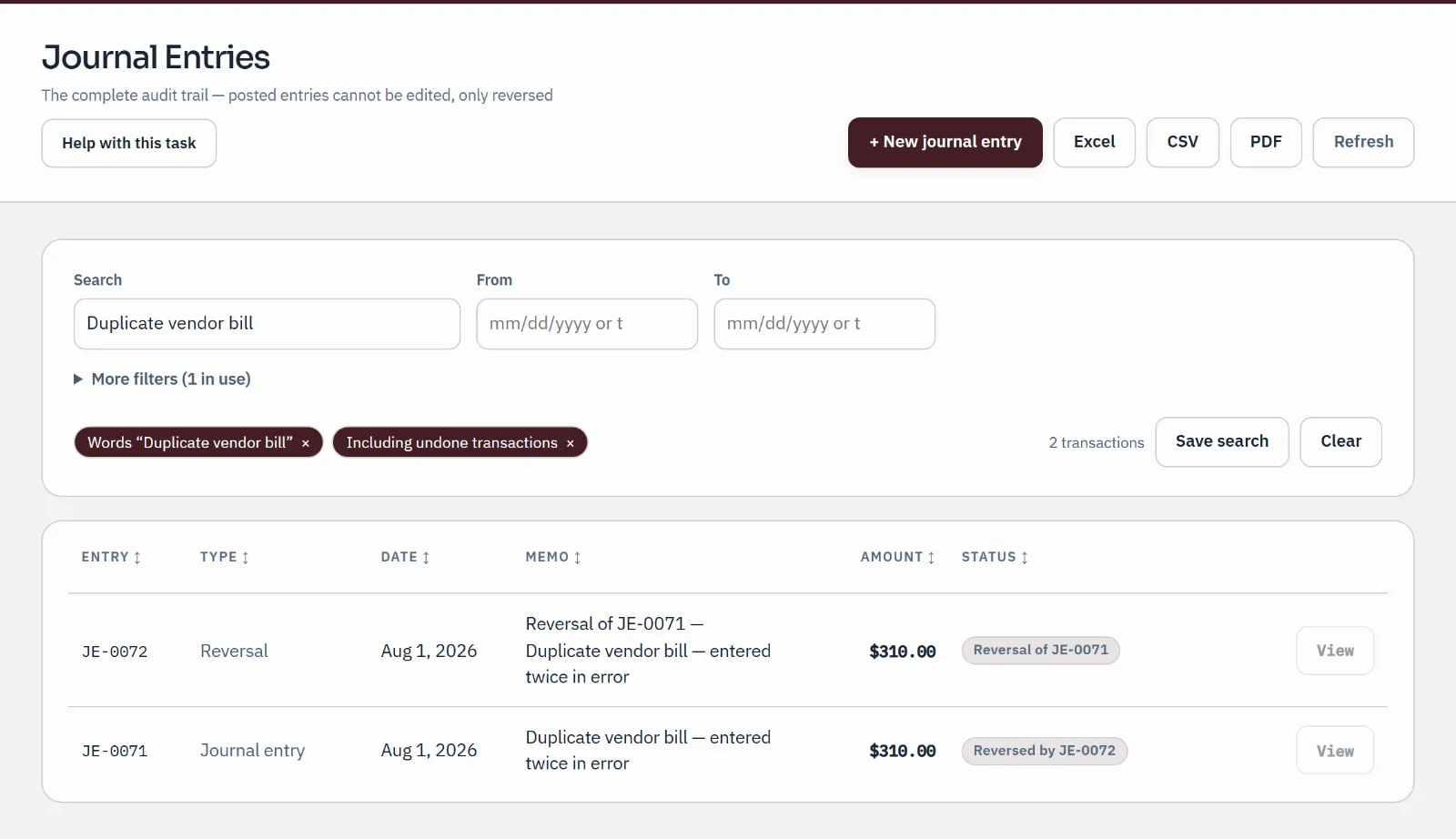
Reverse a wrong entry on its original date, or date the reversal in the current period so a month you have already reported on is left alone. When only the account was wrong, Accountant Tools moves the lines with a separate entry and the reason you give. Either way the original stays, labelled with what corrected it.

  • "Reversal of" and "Reversed by", side by side in the journal
  • Move many lines at once, or one entry from the general ledger
  • A correction dated inside a locked period is refused, and the message says why
Correct a mistake without deleting history
Journal entries
Journal showing a duplicate bill and the reversal that cancels it; both entries stay on the record, labelled "Reversed by" and "Reversal of".
Sample company · synthetic figuresA duplicate bill and the reversal that cancels it. Both stay on the record.

Thursday · Tracing

Every report figure, back to its entries

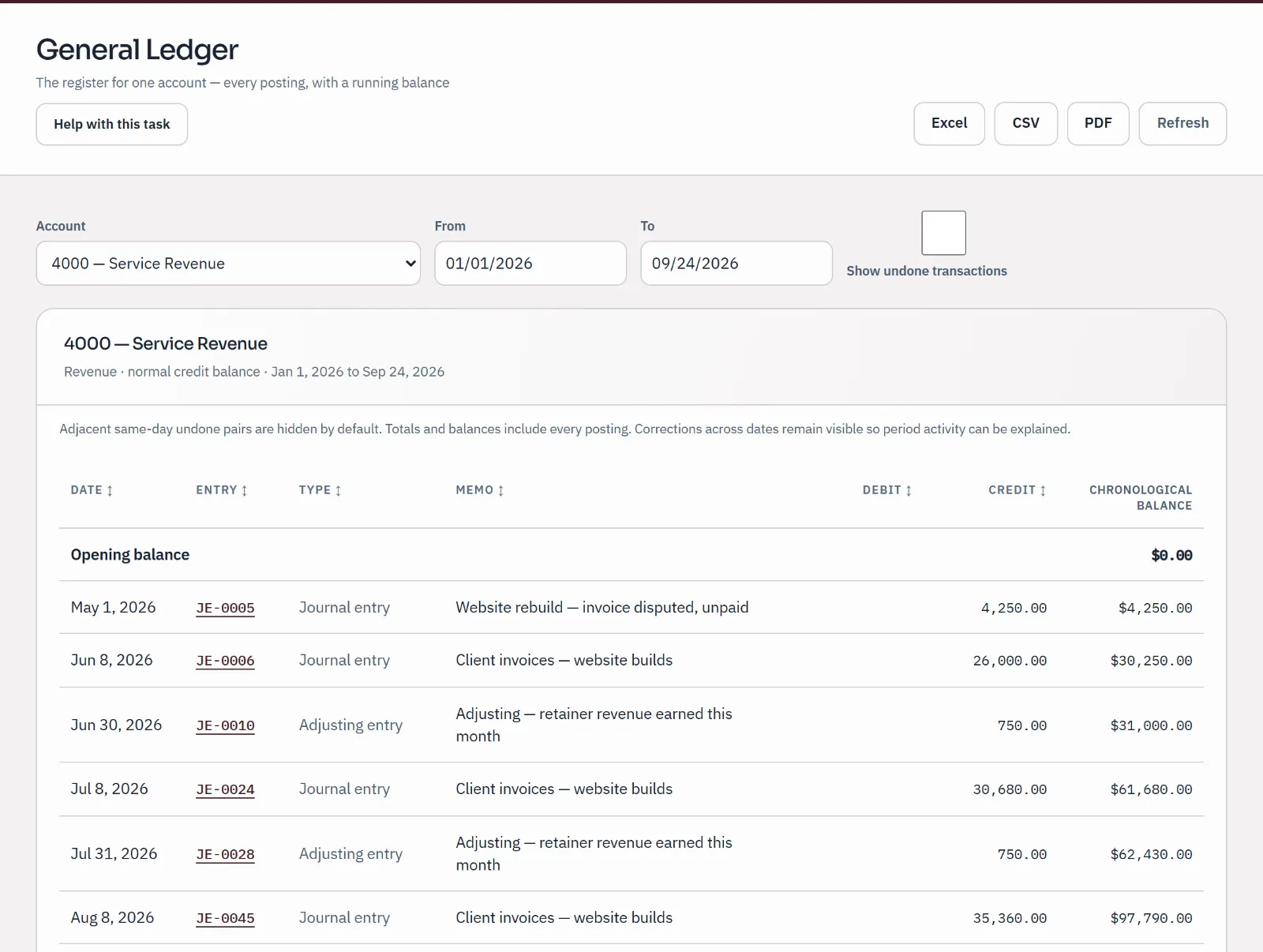
Choose an account on the income statement, balance sheet or trial balance, and the general ledger opens on that account for the same dates. Open an entry to read every line, the memo and any attachment. The ledger total equals the figure you started from.

  • Compare periods side by side, or run the year by month
  • Show undone transactions when you review corrections
  • Export reports to PDF, Excel or CSV
Trace a report balance
General ledger
The General Ledger for Service Revenue, opened from that line of the profit and loss: each posting with its date, entry number, memo, credit and running balance.
Sample company · synthetic figuresService Revenue, opened from its line on the profit and loss: each posting with its running balance.

Month-end · Close and lock

Close the month, then lock it

Month-end takes each client through five steps: gather the statements, review waiting drafts, reconcile each account, review the report pack, and protect the month. Each step says whether its check passed or needs you. Then lock the period so nothing new posts into it, and close the year with an entry that stays on the record.

  • Profit and loss, balance sheet and trial balance open for the month
  • Locking a period and closing the year need an owner or admin
  • The checks read the books; the professional judgement stays yours
Close a month
Balance sheet
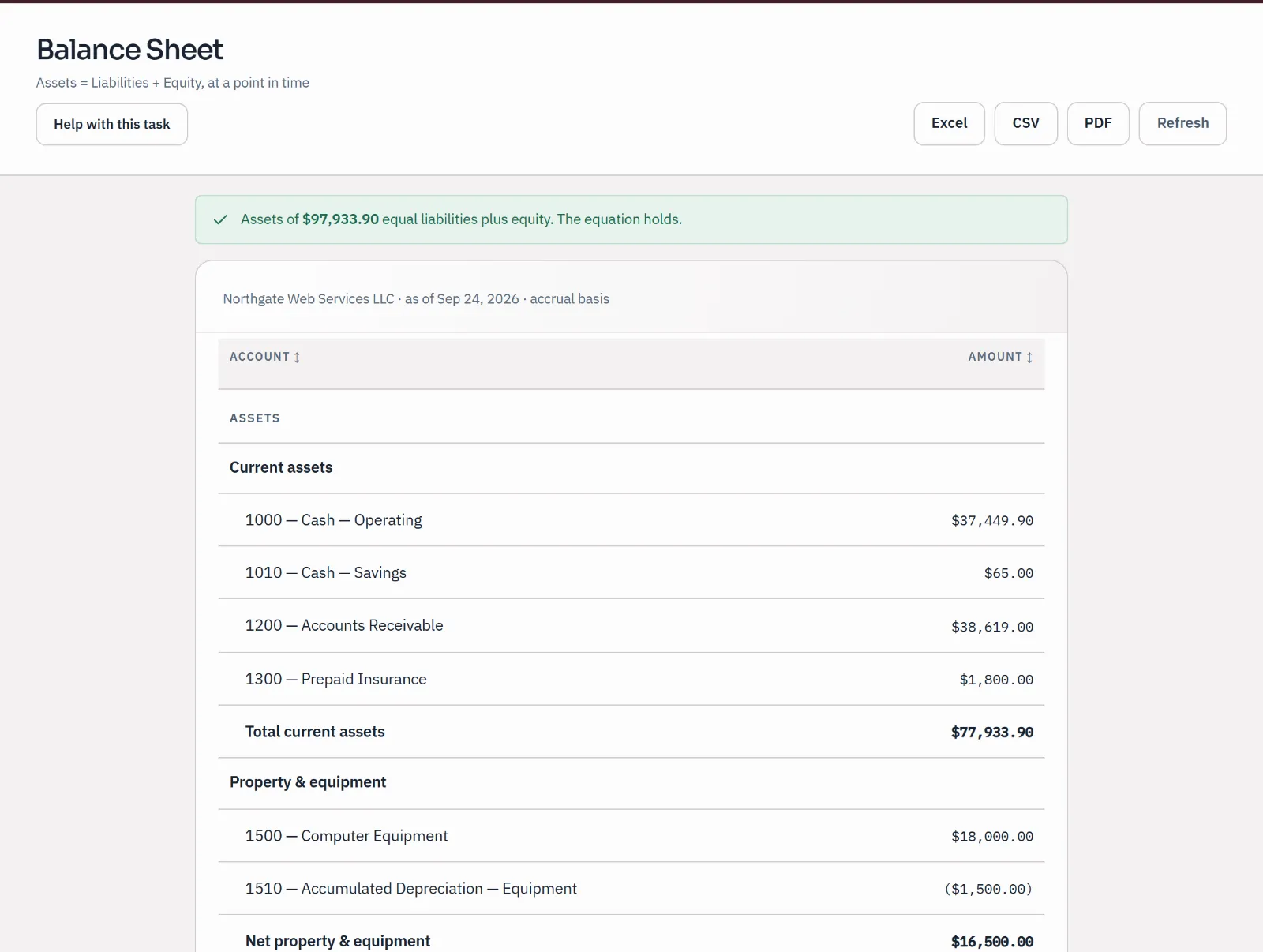
Sample balance sheet as of September 24, 2026, with a check that assets equal liabilities plus equity.
Sample company · synthetic figuresThe balance sheet from the report pack, with its check that assets equal liabilities plus equity.

When someone asks · Evidence

Hand over exactly what was asked for

Narrow the journal to the transactions an auditor or lender asked about, then choose Evidence package. One ZIP holds those transactions, every document attached to them, and a list with each file's fingerprint, so whoever receives it can check each file is the one in the books.

  • A README names any transaction with no document
  • Up to 250 documents and 25 MB in one package
  • Nothing is sent for you: the ZIP saves to your computer
Make an evidence package
Journal entries
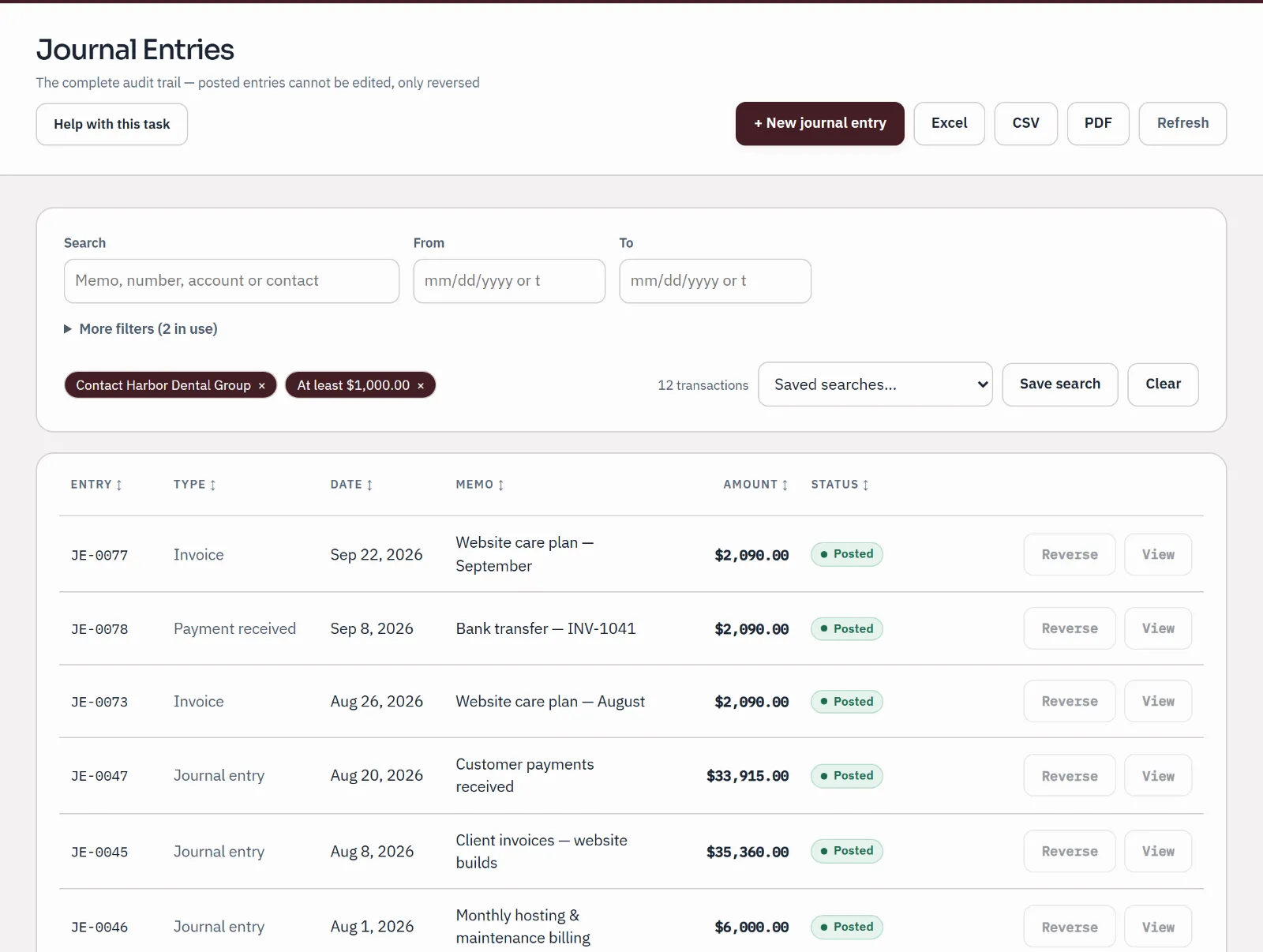
The journal after running a saved search: two filters, contact Harbor Dental Group and at least $1,000.00, leave twelve matching transactions listed by date and amount.
Sample company · synthetic figuresA saved search narrows the journal. An evidence package holds what the list shows.

For the practice

The practice's tools, in the same app as the books.

All Books, client access and the review, correction, reporting and close tools are in every plan, Free included.

  • Needs review

    Your flagged questions, plus holding-account lines and entries missing a contact, an explanation or a document.

Your clients and the practice's mark appear once your account is a practice: sign up through the accountant door and it is one from the start. AI suggestions depend on an outside service and the plan's allowance. Documents and evidence packages need the hosted app. Bank statements come in as files on every plan; live bank feeds through Plaid are on the paid plans.

Your client stays in charge

Their books. Your work in them.

Access runs on the client's say-so, and either side can end it.

  • Two ways in

    The client adds you under Team as a bookkeeper, or as an admin if you should manage their team. Or you open new books for them, and they are invited as owner.

  • Access in plain sight

    The client's Your accountant card names your practice, since when, and whether they invited you or you opened the books for them.

  • Either side can end it

    The client removes your practice, or you stop looking after them. Everyone at the practice loses access at once; the records stay with the client.

How a client invites and removes a practice

Pricing

Free for the practice. Free for every client.

Your practice and any number of clients’ books cost nothing, and no card is needed. Practice, planned at $50 a month or $500 a year, will add live bank feeds and AI, shared with the clients whose books you keep. Paid checkout isn't open yet.

  • Free Usually fits

    FreeNo card needed

    For a business owner, or an accountant and every client.

    Unlimited businesses and people. Your accountant included.

  • Plus

    $10 a monthor $100 a year

    Live bank feeds and AI for your business.

    Live bank accounts: 3 included. AI: 300 a month.

  • Practice

    $50 a monthor $500 a year

    Live bank feeds and AI across a practice and its clients.

    Live bank accounts: 25 included. AI: 3,000 a month.

Every limit and the payment terms

Paid checkout isn't open during the pilot.

Plain answers

Questions accountants ask before they bring clients.

How does a client give us access?

On any plan, Free included, the client invites you under Settings & Close → Team & access, as a bookkeeper, or as an admin if you should manage their team. The invitation works for seven days, and you sign in with the address it was sent to. When you accept, your practice appears on their Your accountant card.

Can we set up books for a new client ourselves?

Yes, from a practice account. Under Your clients, enter the client's name and the owner's email and choose Open their books. Qetaab creates the books, adds you so the work can start today, and invites the owner as owner. The books are theirs from the first day. Sign up through the accountant door and your account is a practice from the start; if you began through the business owner door, email support@qetaab.com to ask.

What does the client see of our work?

The same books you work in. Drafts wait in Approvals, your questions sit in Needs review until someone answers them, and a correction shows beside the entry it corrects. The Activity Log lists who entered what, in the order they entered it.

What happens when we stop working together?

Either side can end it. The client chooses Remove on the Your accountant card, or you choose Stop under Your clients. Everyone at your practice loses access to those books at once. The books stay with the client, and the entries you posted stay on the record.

Is there a subscription charge per client?

No. Your practice is free, and so are the books you keep for clients. Books you open for a client work under your practice's plan: on Free they are free, and on a paid plan they share its live bank feeds and AI. If a paid plan ends, the practice and those books move to Free and nothing is deleted. A client who invites you can do so on any plan. AI suggestions have the monthly allowance shown on the pricing page. Paid checkout isn't open during the pilot.

Can we take a client's books out?

Yes. Reports export to PDF, Excel or CSV. An owner or admin can save a backup copy of the whole books, or export them to a supported accounting exchange file. That export lists anything that doesn't come across, and it is refused while the books don't balance.

Can we bring clients over from another accounting system?

You bring each client's books as files exported from the old software. Qetaab reads them and shows what would come in before anything is added, and the old books are never changed. How far that goes today depends on the program: see what Qetaab includes, and email support@qetaab.com before you plan a move.

Does Qetaab connect to a client's bank?

On the paid plans, yes, through Plaid: the client's bank or card transactions arrive for review on their own, and you reconcile until the difference is $0.00. Any plan can import the statement file the bank gives you (CSV, OFX, QFX or QBO) instead.