
Corrections
Correct a mistake without deleting history
A wrong entry is cancelled by a reversal that stays on the record, and reports show the corrected position.
- Who this is for
- Owner, admin or bookkeeper.
- Before you start
- The number or date of the entry to correct.
- Availability
- Available in the hosted app and the local build.
Steps
- Posted journal entries are preserved. Use a reversal for a correction or the appropriate reclassification tool for a wrong account.
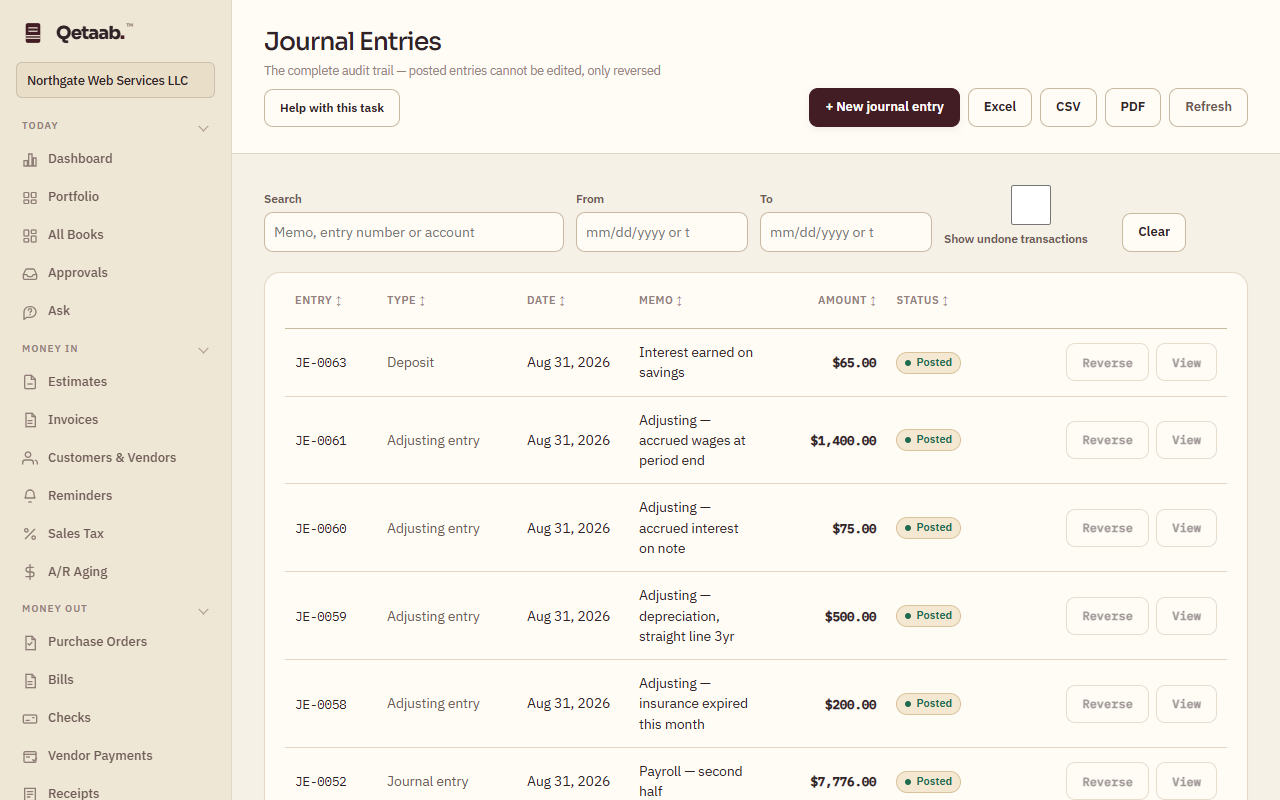
- Open Journal Entries (under Books), find the entry and choose Reverse. Choose Date the reversal: the original date erases the effect entirely; a later date corrects in the current period without disturbing a month you have already reported on.
- Choose Post reversal, then post the correct entry if one is needed.
- Review dates and period locks before correcting an entry. Check the supporting report after the correction.
- Save a backup before a significant import or cleanup; never use demo books as a replacement for unavailable hosted books.
What you should see
The reversal posts with its own number, the original shows as reversed, and the General Ledger can hide the adjacent undone pair with Show undone transactions off.
If it goes wrong
If Reverse is not offered, the entry is already reversed or is itself a reversal. A refusal naming a period lock means the reversal date is inside the lock; date the reversal after the lock or move the lock.
What it looks like
Related guides
Steps checked in the app on 2026-09-21. This guide describes how the software works; it is not accounting, tax or legal advice. Need a hand? Email support@qetaab.com.
All guides →