Inventory

Stock and books that move together.

Purchase orders, receiving, pick, pack and dispatch, lots and counts, in the same books as your invoices and bills. Receiving creates the supplier bill; dispatching a sale creates the customer invoice.

Free. No card needed. Accountant or bookkeeper? Start through the accountant door. Inventory is in every plan, Free included.

Inventory
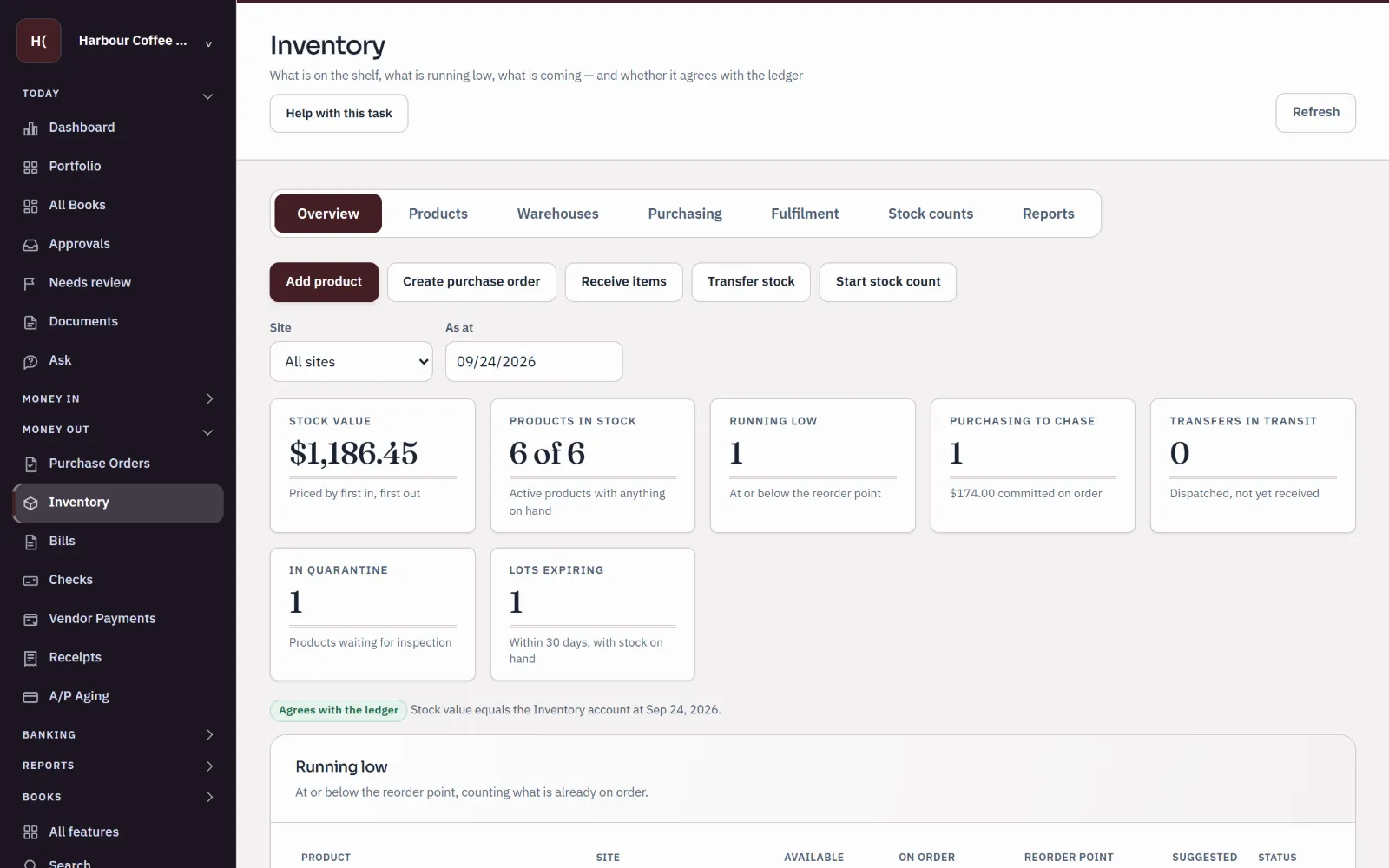
Sample inventory overview for Harbour Coffee Supply: stock value $1,186.45 priced first in, first out, one product running low, one purchase to chase, one item in quarantine, one lot expiring, and a badge saying stock agrees with the ledger.
Sample company · synthetic figures
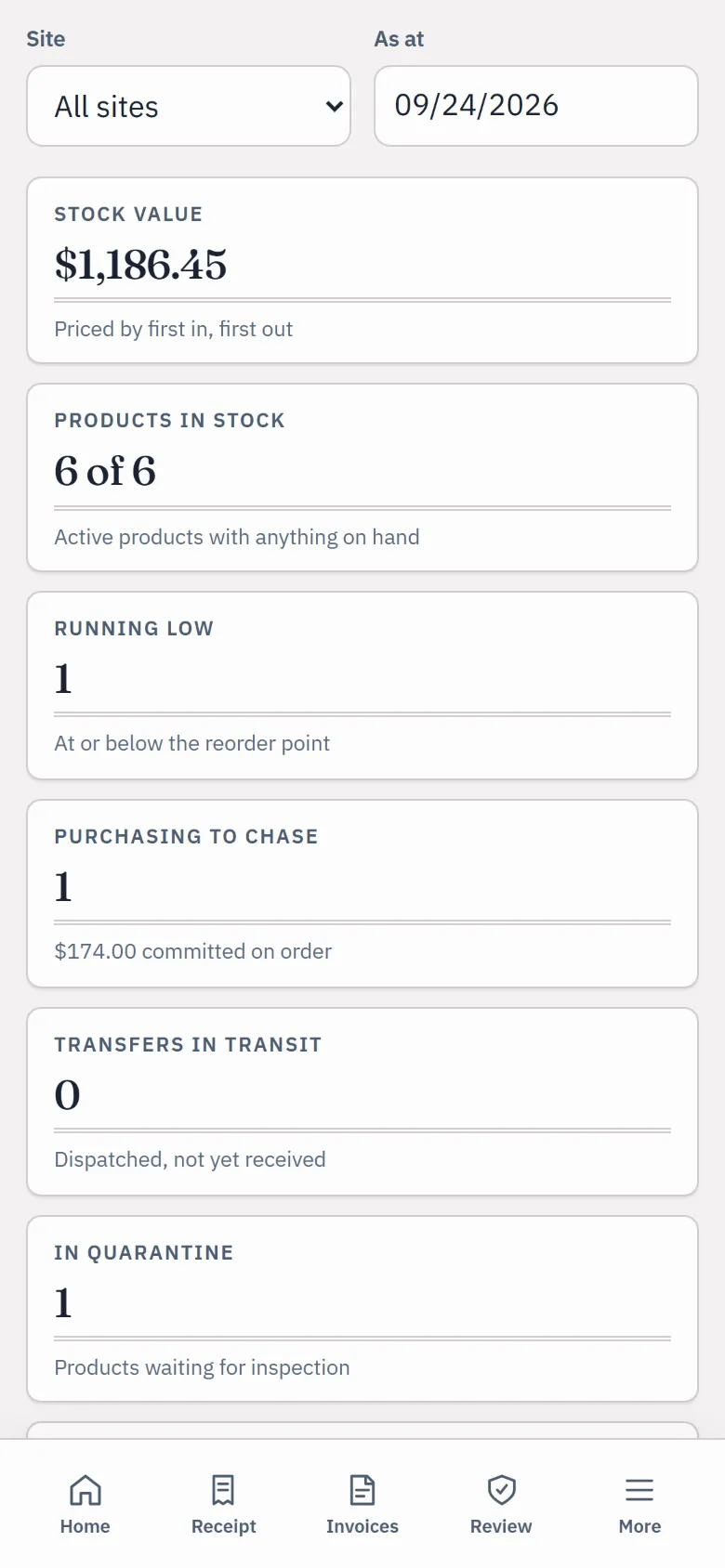
The sample inventory overview on a phone: site and date filters, stock value $1,186.45 and products in stock.
Sample company · synthetic figures

Why stock belongs in the books

One record of what you hold and what it's worth.

  1. 01

    Nothing typed twice.

    Receiving an order posts the bill. Dispatch posts the invoice, the cost of sales and the stock leaving, once.

  2. 02

    Know what you can promise.

    On hand, set aside for customers, in quarantine and on order, by site and bin.

  3. 03

    A count that tells the truth.

    Blind counts keep the expected figures from the counter, and the whole count posts as one entry.

  4. 04

    Value your accountant can follow.

    Stock is priced first in, first out or at average cost and checked against the Inventory account.

On the real screens

From the supplier's truck to the customer's door.

Screens from a sample coffee supplier with synthetic figures.

Products and places

Every product, where it sits and what it's worth

Keep products with their units, cost and tracking, spread across sites and bins. See at a glance what is on hand, what is free to sell, and what each site holds.

  • Sites and bins, with transfers between them
  • Lots with expiry dates, and serial numbers
  • Stock reports download as Excel or CSV
Run your stock
Products
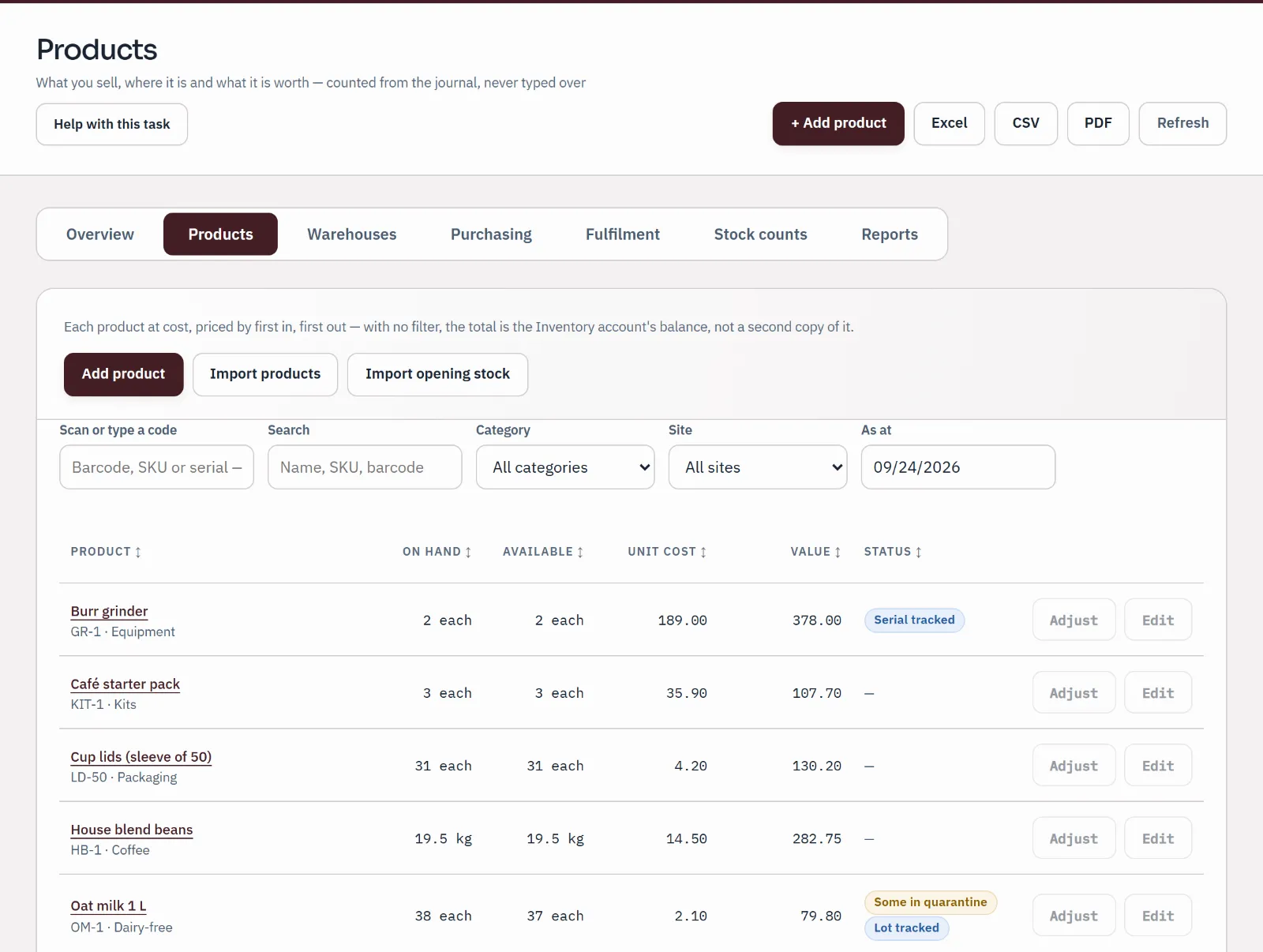
Sample products list: grinder, starter pack, cup lids, beans, oat milk and paper cups with quantity on hand, available, unit cost, value and tracking status.
Sample company · synthetic figuresOn hand, available, unit cost, value and tracking for each product.

Buy and receive

Receive the order. The bill is already there.

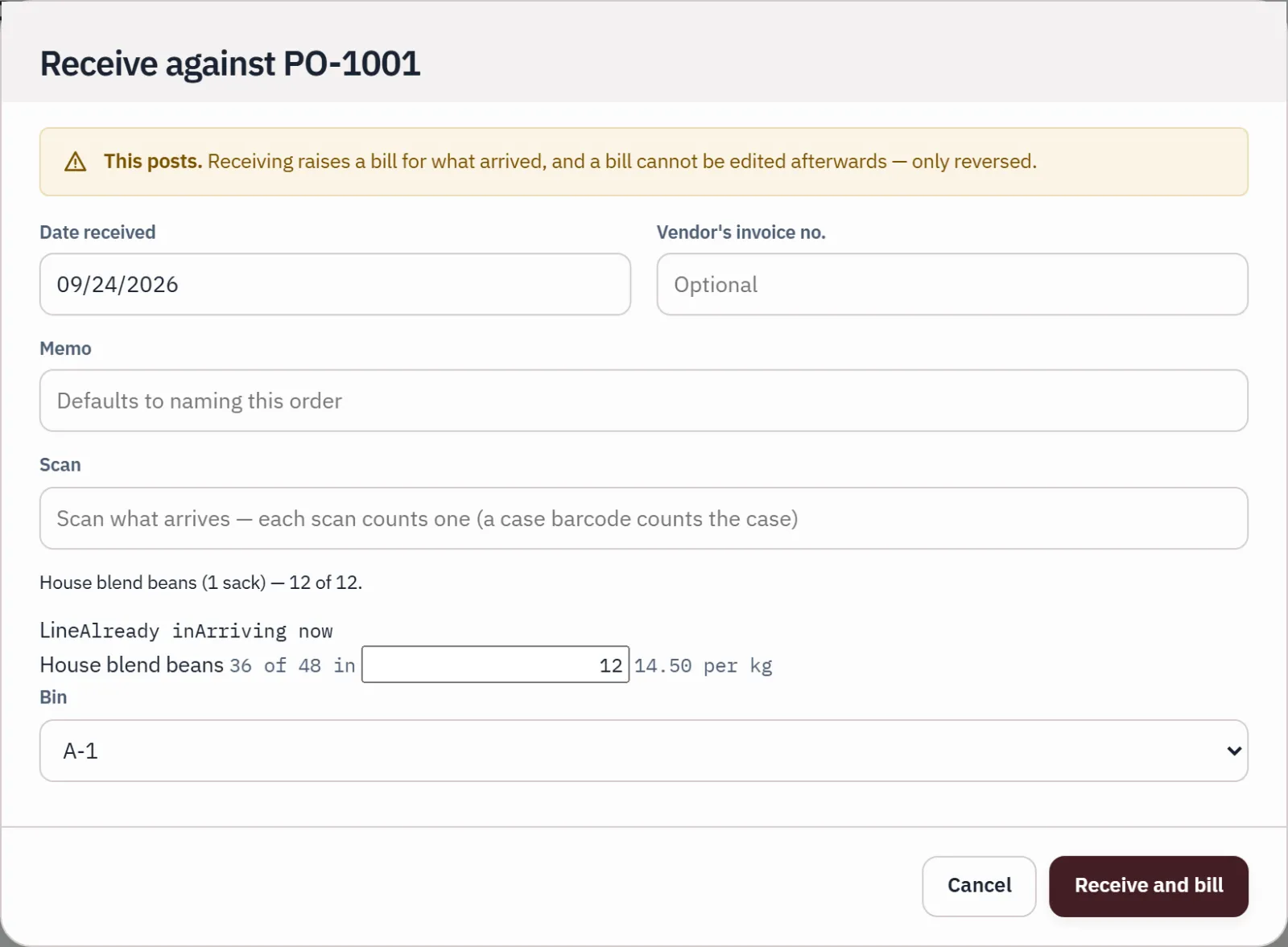
Send a purchase order to the supplier. When the goods arrive, scan or enter what came, the bin it went to and any lot or serial numbers, and receiving posts the supplier bill.

Receiving, step by step
Receive PO-1001
Receiving purchase order PO-1001: one scanned sack barcode counts 12 kg of beans arriving, and a banner says receiving creates the bill.
Sample company · synthetic figuresOne scanned barcode counts 12 kg of beans arriving.

Sell and ship

Pick, pack and dispatch

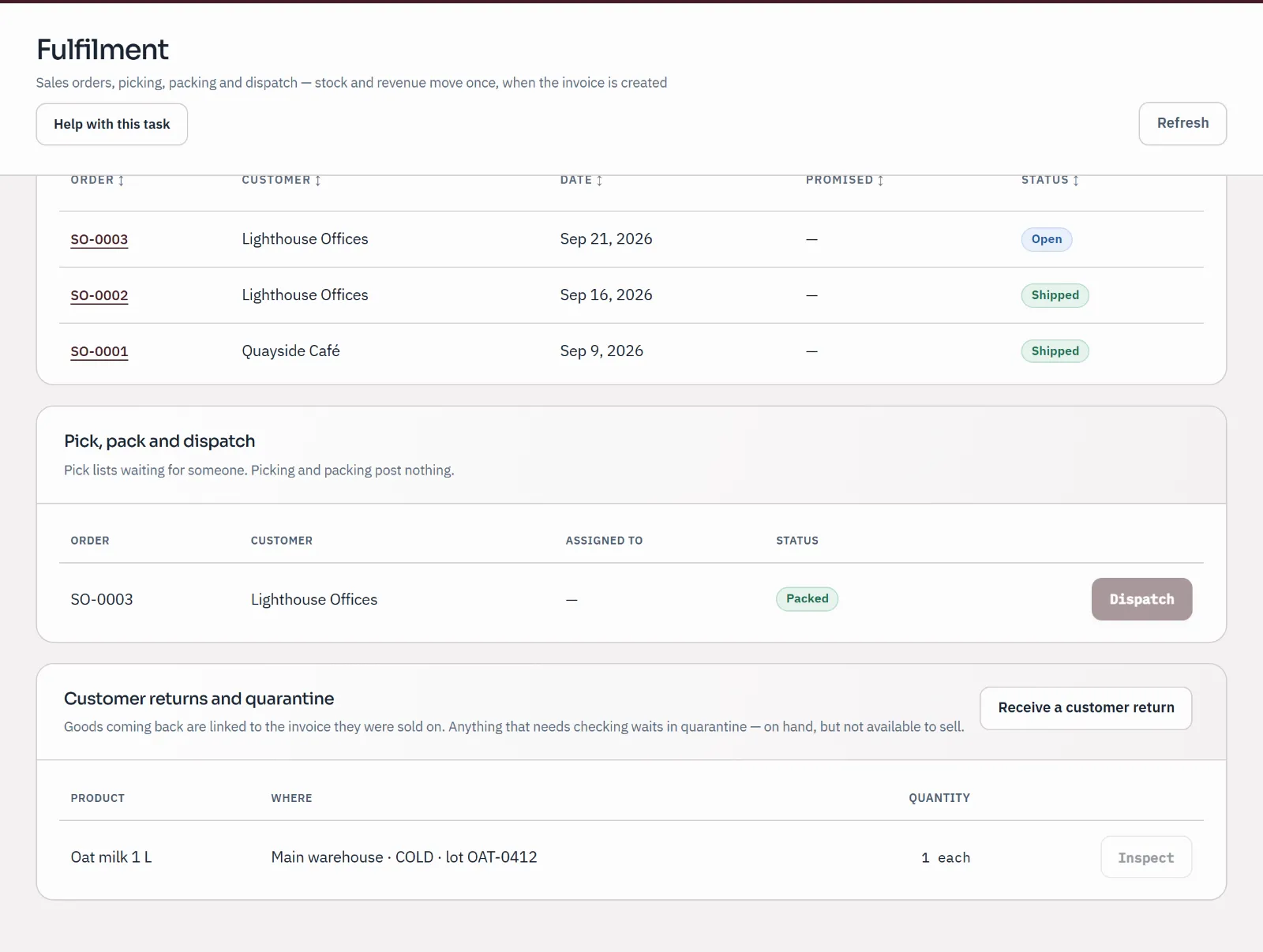
Take a sales order, set the stock aside, and work the pick list by scanning or ticking. Picking and packing post nothing; Dispatch and invoice creates the customer invoice, and the stock and its cost leave once.

  • The pick list suggests the lot that expires first
  • Returns link to the invoice and can wait in quarantine
Pick, pack and dispatch
The pick, pack and dispatch queue with SO-0003 packed and waiting to be dispatched; picking and packing post nothing.
Sample company · synthetic figuresSO-0003 packed and waiting to be dispatched.

Count

Count the shelf, fix the books in one entry

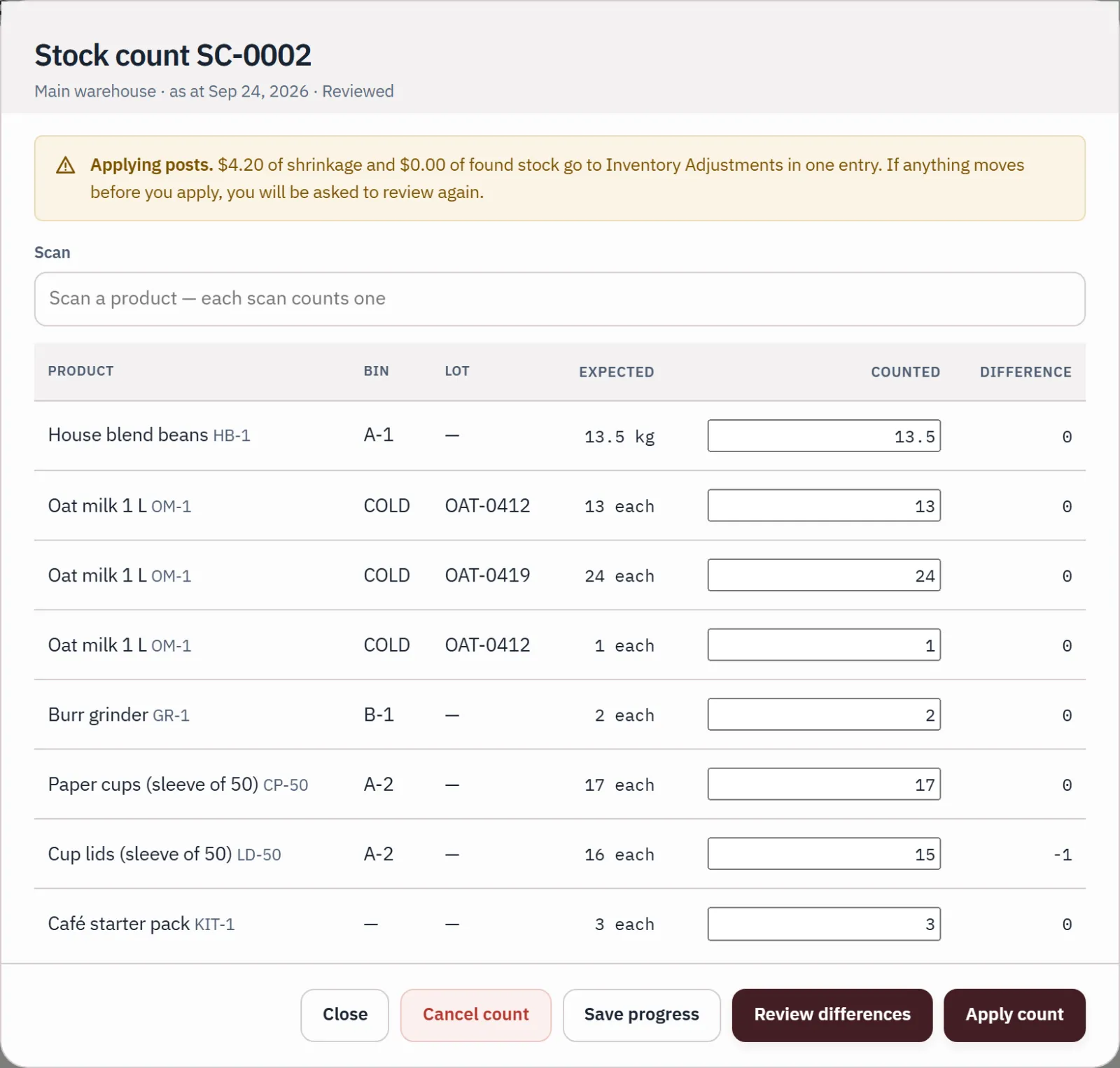
Start a blind count for a site or a few bins, enter or scan what you find, and review the differences before you apply it. A company can require a second person, who did not count, to approve it first.

Counting stock
Stock count
Stock count under review: expected, counted and difference per line, one sleeve of cup lids short, and a banner saying applying posts $4.20 of shrinkage in one entry.
Sample company · synthetic figuresExpected, counted and difference per line; applying posts $4.20 of shrinkage.

Value

Stock value and the ledger, side by side

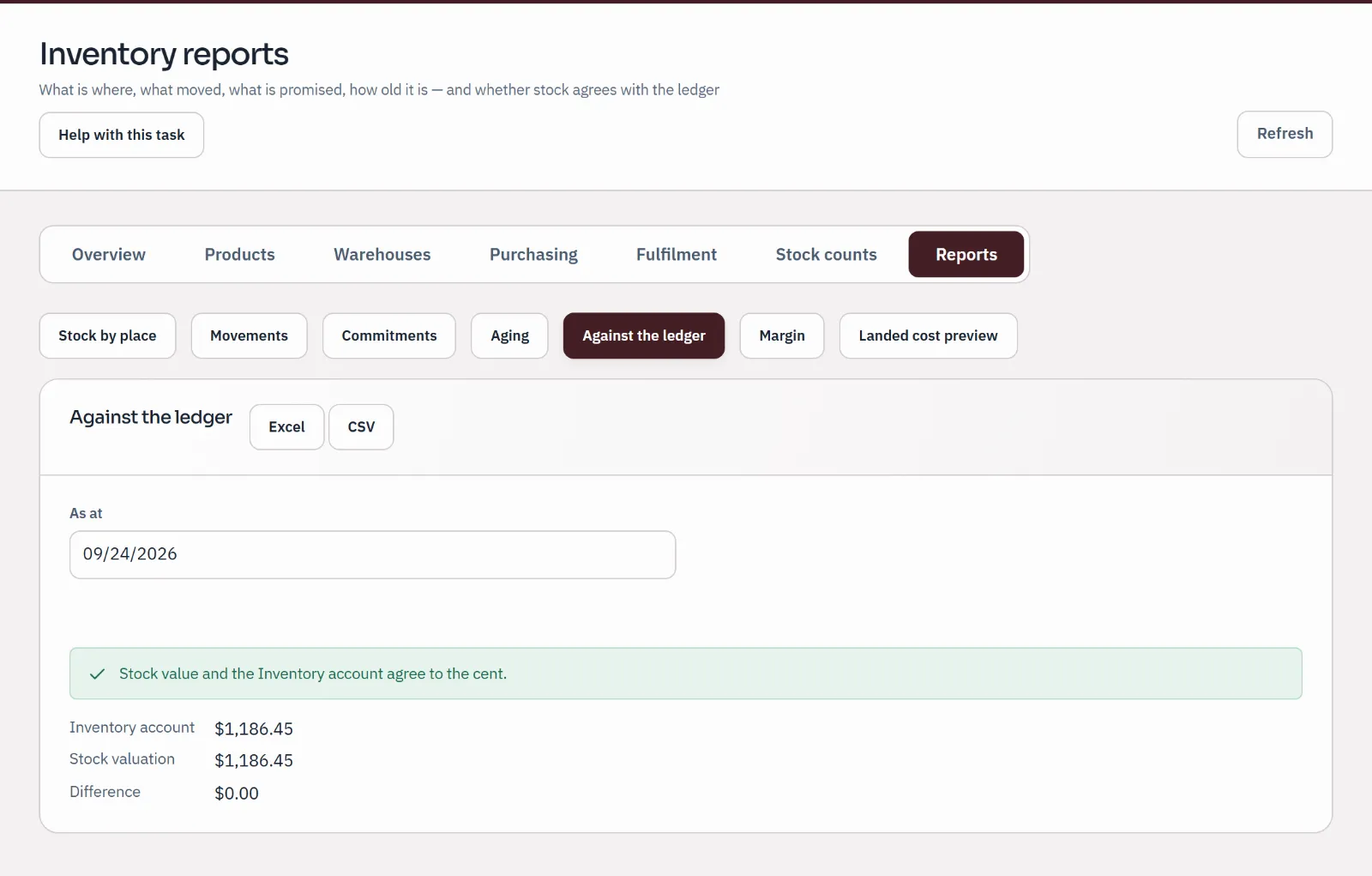
The valuation report sets the value of your stock against the Inventory account. When they agree, it says so; when they don't, the difference is listed with its cause for you and your accountant.

Against the ledger
Stock valuation against the ledger: Inventory account $1,186.45, stock valuation $1,186.45, difference $0.00.
Sample company · synthetic figuresInventory account and stock valuation agree: difference $0.00.

Inventory for product businesses

From purchase order to stock count.

Receiving an order creates the supplier bill and dispatching a sale creates the customer invoice, so your stock and your books move together.

Sample figures · synthetic product and companies

House blend beans, 1 kg bag

SKU HB-1KG · lot tracked · 9.00 a bag at cost

  • Available
  • Set aside
  • Quarantine
  • On order
  1. Step 1: Order from the supplier

    With 20 bags on the shelf, purchase order PO-1042 asks Northshore Roastery for 100 more at 9.00. An order is a promise, so nothing posts yet.

    In your books

    Nothing posts

    On hand
    20
    Available
    20
    Stock value
    180.00
  2. Step 2: Receive into a bin

    The bags go into Main warehouse, bin A-2. Receiving creates the supplier bill, so the stock and what you owe arrive together.

    In your books

    • Supplier bill900.00
    On hand
    120+100
    Available
    120+100
    Stock value
    1,080.00+900.00
  3. Step 3: Lots and serial numbers

    Lot HB-0916, expiring Dec 16, joins lot HB-0902 on the shelf. Trace a lot, or a serial number, from supplier to customer.

    In your books

    Nothing posts

    On hand
    120
    Available
    120
    Stock value
    1,080.00
  4. Step 4: Take the customer’s order

    Quayside Café orders 70 bags at 16.00. Set stock aside reserves them: still on the shelf, but no longer free to promise.

    In your books

    Nothing posts

    On hand
    120
    Available
    50−70
    Stock value
    1,080.00
  5. Step 5: Pick, pack and dispatch

    The pick list suggests the lot that expires first. Dispatch and invoice creates the customer invoice, and the stock and its cost leave once.

    In your books

    • Customer invoice1,120.00
    • Cost of sales630.00
    On hand
    50−70
    Available
    50
    Stock value
    450.00−630.00
  6. Step 6: Take a return

    Two torn bags come back against the invoice, at the cost they left at, and wait in quarantine until someone inspects them.

    In your books

    • Credit memo32.00
    • Back in stock18.00
    On hand
    52+2
    Available
    50
    Stock value
    468.00+18.00
  7. Step 7: Count the shelf

    A blind count finds 49 bags where the books say 50. The whole count posts as one entry, and can wait for a second person to approve it.

    In your books

    • Inventory adjustment9.00
    On hand
    51−1
    Available
    49−1
    Stock value
    459.00−9.00
  8. Step 8: Check the value against the books

    Stock is priced first in, first out or at average cost, then checked against the Inventory account. Any difference is listed with its cause.

    In your books

    • Inventory account459.00
    • Agrees with the ledger
    On hand
    51
    Available
    49
    Stock value
    459.00

Also on the same screens

Transfers between sites, reorder suggestions, returns to suppliers, simple kits, and stock reports you can download as Excel or CSV.

Read the stock guide

What's included

The whole stock cycle, in every plan.

  • Purchase orders

    Order from suppliers and see what is late or still on the way.

  • Receiving and bills

    Receive into a bin with lot or serial numbers; the supplier bill posts as you receive.

  • Sales orders

    Set stock aside for a customer: still on the shelf, but no longer free to promise.

  • Pick, pack and dispatch

    Scan or tick as you pick; dispatch creates the invoice and the cost of sales.

  • Sites, bins and transfers

    Stock in more than one place, and what is on the road between them.

  • Returns and quarantine

    Returns link to the invoice and wait for inspection before they go back on the shelf.

  • Lots and serial numbers

    Trace a lot or a serial number from the supplier to the customer.

  • Blind counts and approval

    Counters don't see what the books expect; a second person can approve.

  • Valuation and reports

    First in, first out or average cost; stock by place, movements, aging and commitments.

Pricing

Inventory isn't an add-on. It's in every plan.

Free has room for every business and everyone who counts and approves. Plus adds live bank feeds and AI.

  • Free Usually fits

    FreeNo card needed

    For a business owner, or an accountant and every client.

    Unlimited businesses and people. Your accountant included.

  • Plus

    $10 a monthor $100 a year

    Live bank feeds and AI for your business.

    Live bank accounts: 3 included. AI: 300 a month.

  • Practice

    $50 a monthor $500 a year

    Live bank feeds and AI across a practice and its clients.

    Live bank accounts: 25 included. AI: 3,000 a month.

Every limit and the payment terms

Paid checkout isn't open during the pilot.

Plain answers

Questions product businesses ask about stock.

Is inventory an extra charge?

No. Inventory is in every plan, Free included. See the pricing page for what each plan includes.

Can I receive goods before the supplier's bill arrives?

Not yet. Receiving an order creates the supplier bill at the same time, and dispatching a sale creates the customer invoice at the same time. Receiving before the bill and shipping before the invoice are not built.

Do freight and duty go into the cost of my stock?

Not yet. Landed costs can be previewed but not posted.

Does Qetaab connect to my online shop or till?

No live connection to an online shop or a point-of-sale till is part of the pilot. Record sales as sales orders or invoices in Qetaab, and email support@qetaab.com to talk through your setup.

How is stock valued?

First in, first out or average cost. The valuation report checks the value against the Inventory account; if an old product's history can't be priced first in, first out, it is flagged for you and your accountant to review. Nothing is rewritten for you.