
Qetaab/Help/Review & approvals
Review & approvals
Approve a draft
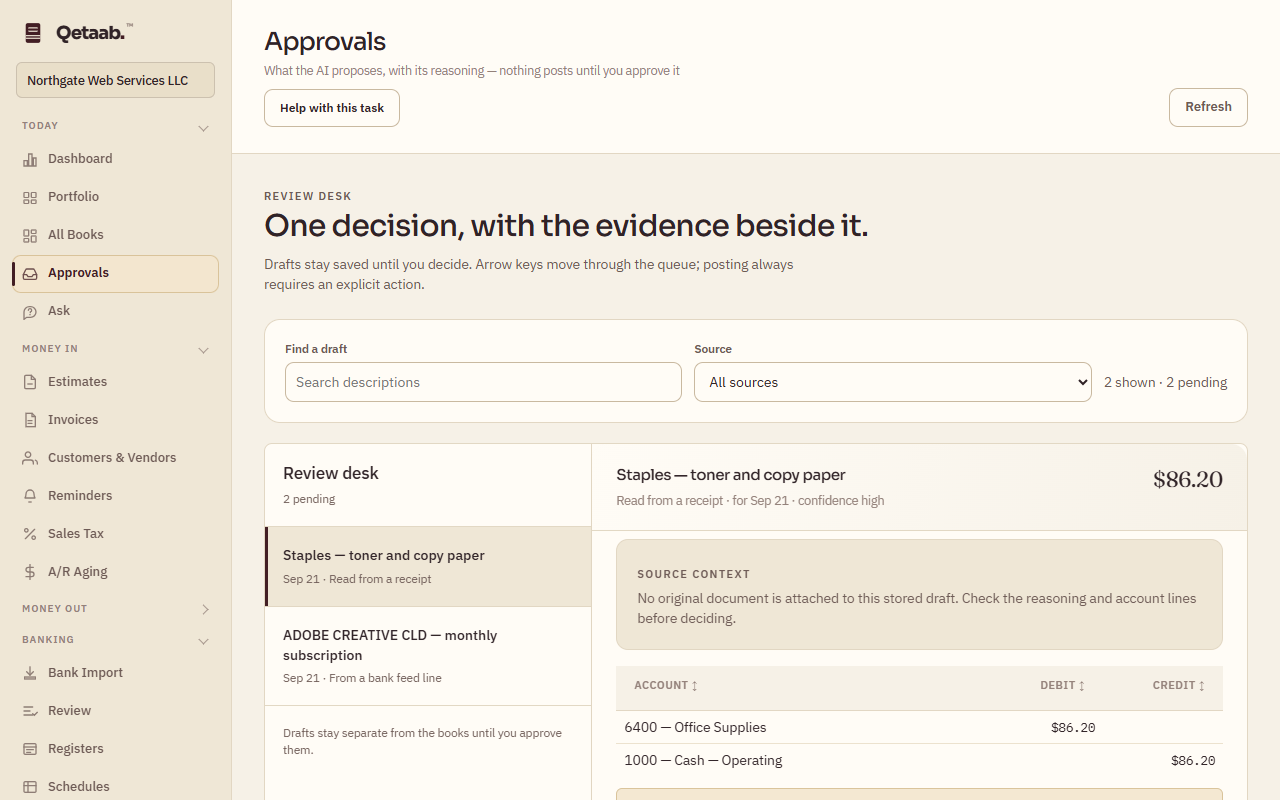
A draft entry waiting in the queue is posted, declined, or replaced by a manual entry — with the evidence beside each decision.
- Who this is for
- Owner, admin or bookkeeper. Viewers can read the queue but cannot approve.
- Before you start
- Drafts in the queue: rows sent with Queue for approval from Bank Import, AI suggestions, or requests from the business.
- Availability
- Available in the hosted app and the local build. AI-drafted suggestions require the AI service; nothing the AI drafts is posted without a person approving it.
Steps
- Open Approvals (under Today). The Review desk lists every pending draft; Find a draft and Source filter the list, and Clear filters resets it.
- Open a draft and read its source context, reasoning, account lines and amount.
- Choose Approve & post only after reviewing the draft, or Decline if it should not be recorded. Declined drafts post nothing.
- Create a manual entry opens the journal form with the draft’s details but leaves the original draft pending. Review that original after posting the replacement, and decline it, to avoid a duplicate.
- Requests from the business — for example a request to pay someone — show as their own cards with Open check writing, Mark done and Decline. Recently decided keeps what was handled.
What you should see
An approved draft becomes a posted entry with a number and moves to Recently decided; the pending count at the top of the Review desk falls.
If it goes wrong
If Approve & post is disabled, the draft is incomplete (no account) or your role cannot post. A refusal naming a period lock means the draft is dated inside a locked period.
What it looks like
Related guides
Steps checked in the app on 2026-09-21. This guide describes how the software works; it is not accounting, tax or legal advice. Need a hand? Email support@qetaab.com.
All guides →