
Month-end & close
Close a month
The month’s statements are imported, drafts reviewed, accounts reconciled, reports read and the period protected — with a checklist that shows what is still open.
- Who this is for
- Owner, admin or bookkeeper. Locking the period needs an owner or admin.
- Before you start
- Bank and card statements for the month.
- Availability
- Available in the hosted app and the local build.
Steps
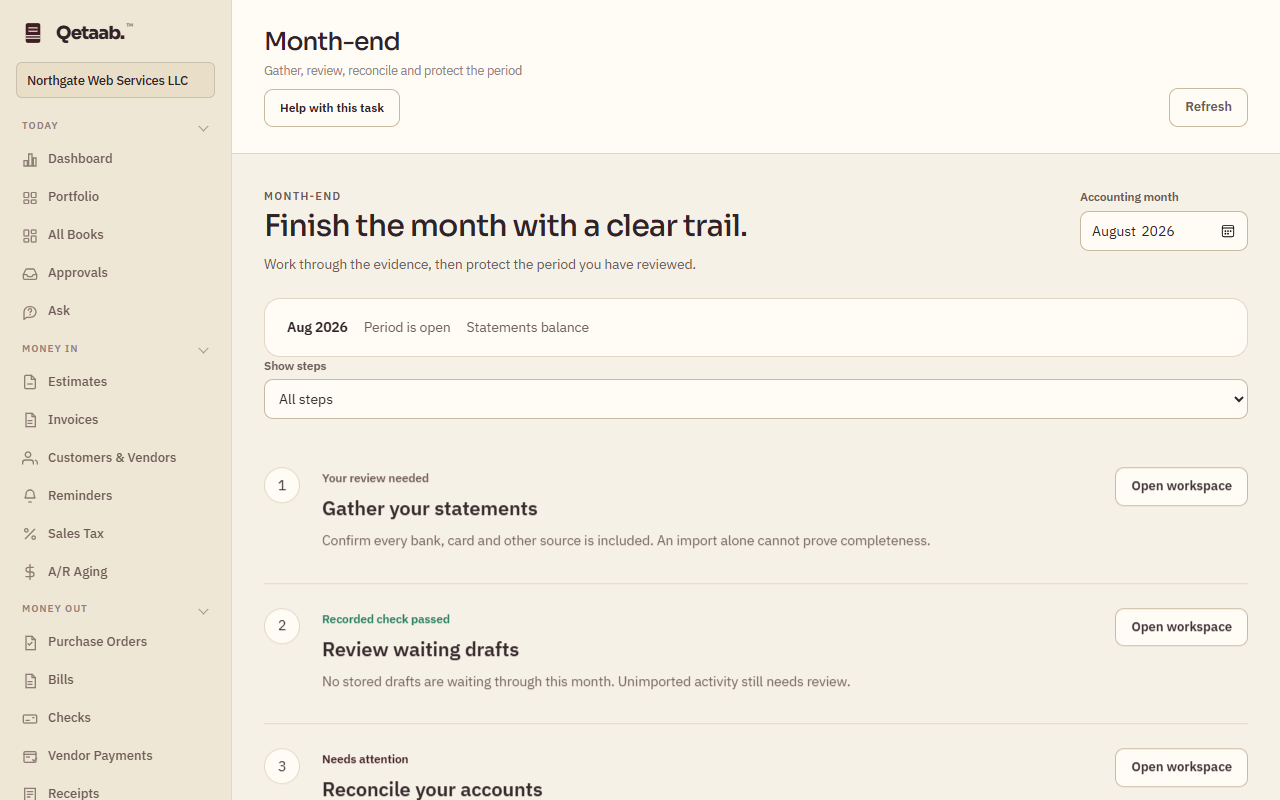
- Open Month-end (under Books) and choose the Accounting month. The summary says whether the period is open or locked and whether the statements balance.
- Work down the five steps: Gather your statements, Review waiting drafts, Reconcile your accounts, Review the report pack and Protect the completed month. Each shows Recorded check passed, Needs attention or Your review needed, and Open workspace takes you to the screen.
- Under Reconcile your accounts, each bank account shows Reconciliation recorded or Check statement; choosing one opens Reconcile with the statement date filled in.
- Under Review the report pack, Profit & loss, Balance sheet and Trial balance open for the month.
- Resolve unexplained balances, then choose Open period controls to lock the period in Settings. A lock protects the period from new postings; it is not a substitute for reviewing the books.
What you should see
Every step reads Recorded check passed, or Your review needed where the software cannot check for you, and the period shows Period lock recorded.
If it goes wrong
Show steps → Needs attention or review narrows the list to what is left. These checks update from your books; they do not certify source completeness, professional review or tax readiness.
What it looks like
Related guides
Steps checked in the app on 2026-09-21. This guide describes how the software works; it is not accounting, tax or legal advice. Need a hand? Email support@qetaab.com.
All guides →