
Reports
Trace a report balance
Any figure on a financial report can be followed to the journal entries that make it up.
- Who this is for
- Anyone with access to the books, including viewers.
- Before you start
- A report open with the dates you want to review.
- Availability
- Available in the hosted app and the local build.
Steps
- Choose the date range and reporting basis before comparing reports.
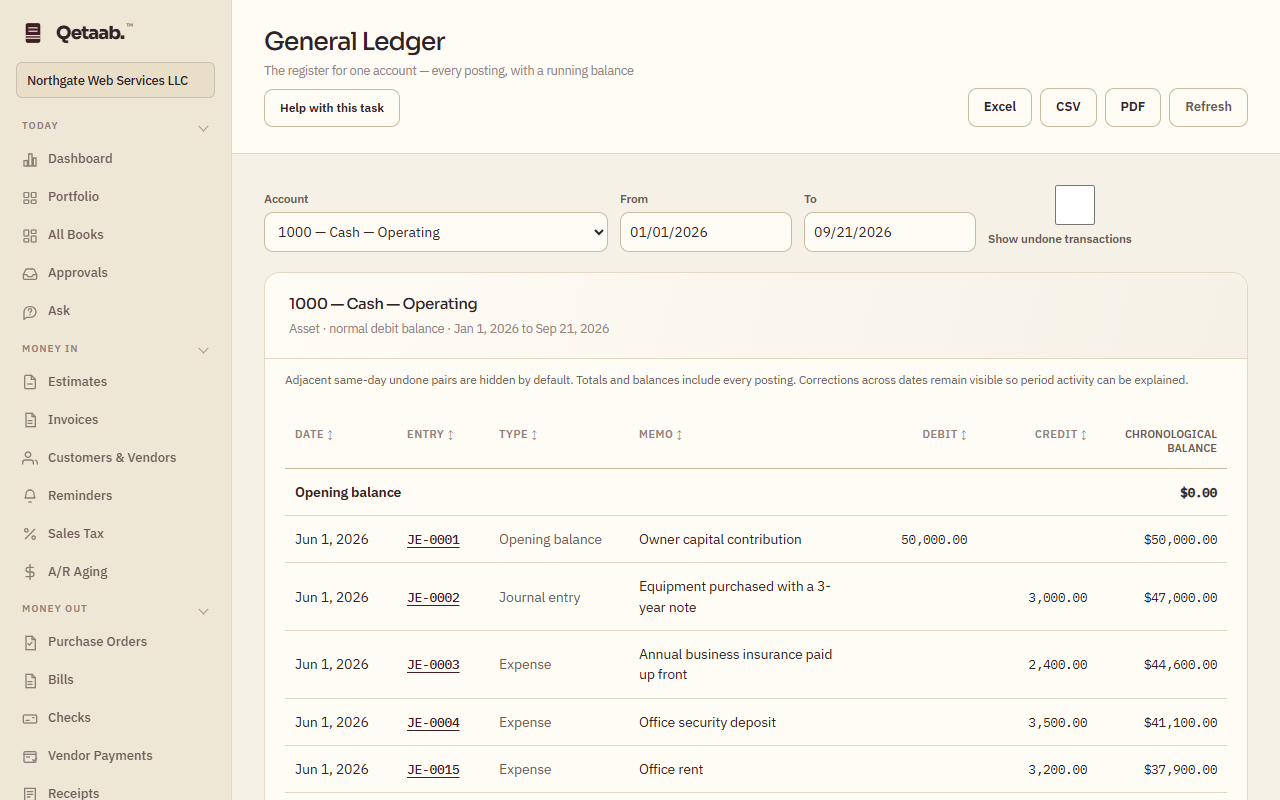
- Use account links to inspect the supporting ledger activity: on the Income Statement, Balance Sheet, Trial Balance and Chart of Accounts, choose an account name to open the General Ledger for that account. A period report carries its dates across; a cumulative report shows the account’s whole history.
- In the General Ledger, choose an entry to open it and read every line, the memo and any attachment.
- Corrections remain part of the journal. Adjacent same-day undone pairs can be hidden for readability while totals still include every posting.
- Use Show undone transactions when reviewing corrections.
What you should see
The General Ledger total for the account and dates equals the figure you started from.
If it goes wrong
If the ledger total differs from the report, check that the ledger’s From and To match the report’s period and that the basis (accrual or cash) is the same.
What it looks like
Related guides
Steps checked in the app on 2026-09-21. This guide describes how the software works; it is not accounting, tax or legal advice. Need a hand? Email support@qetaab.com.
All guides →