For wholesale and distribution

Order in, ship out. The books move with the stock.

Buy on purchase orders, receive into the right site and bin, then pick, pack and dispatch to customers on their own terms. Receiving creates the supplier bill and dispatch creates the invoice, so what you owe, what you are owed and what is on the shelf come from the same books.

Free. No card needed. Accountant or bookkeeper? Start through the accountant door.

Fulfilment
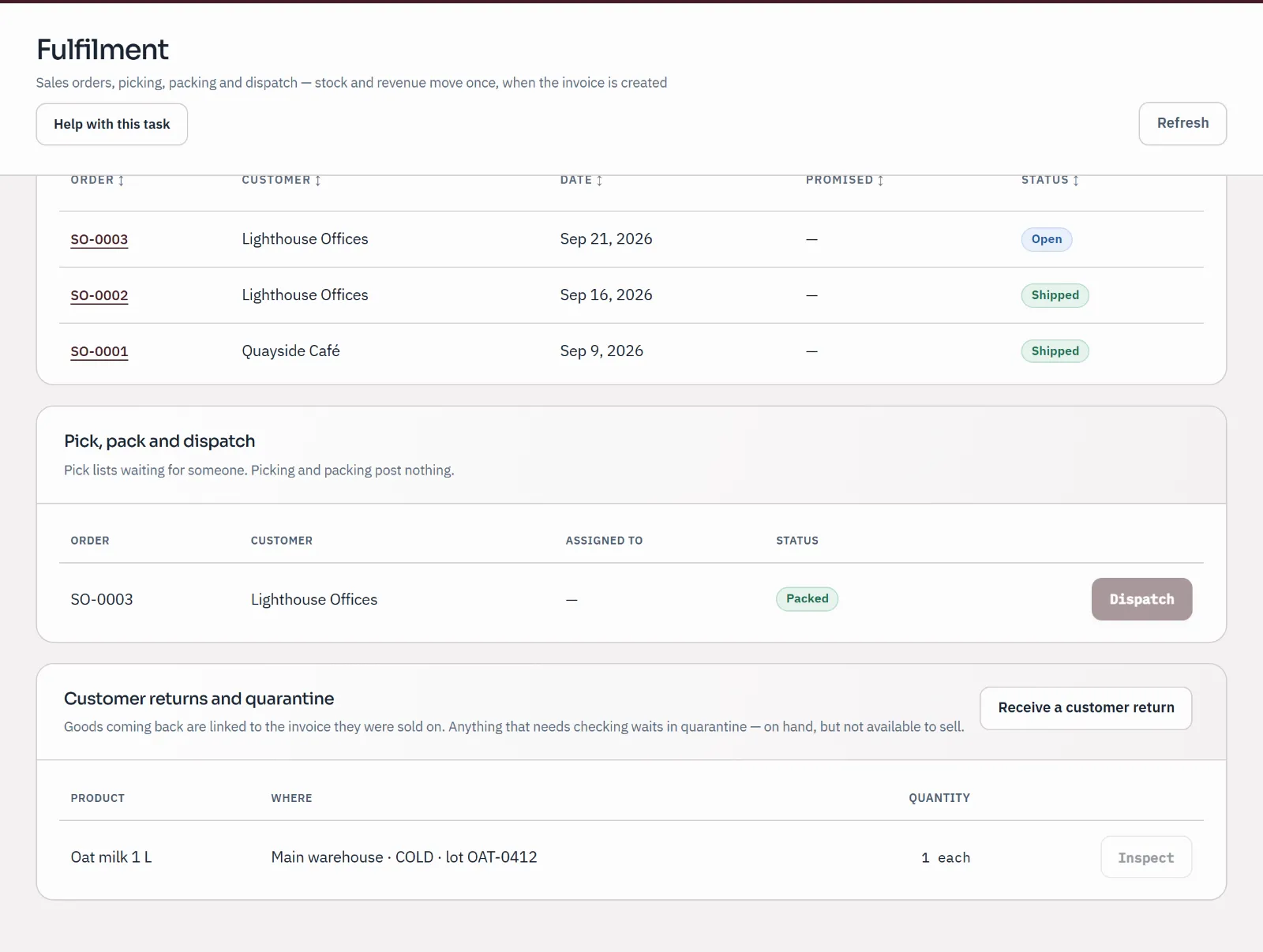
The pick, pack and dispatch queue with SO-0003 packed and waiting to be dispatched; picking and packing post nothing.
Sample company · synthetic figures

One order, start to finish

Purchase order to paid invoice.

Real screens from Harbour Coffee Supply, a sample coffee and café supplier. Each step says what reaches the books.

Buy · Receive

The goods arrive, and the bill with them

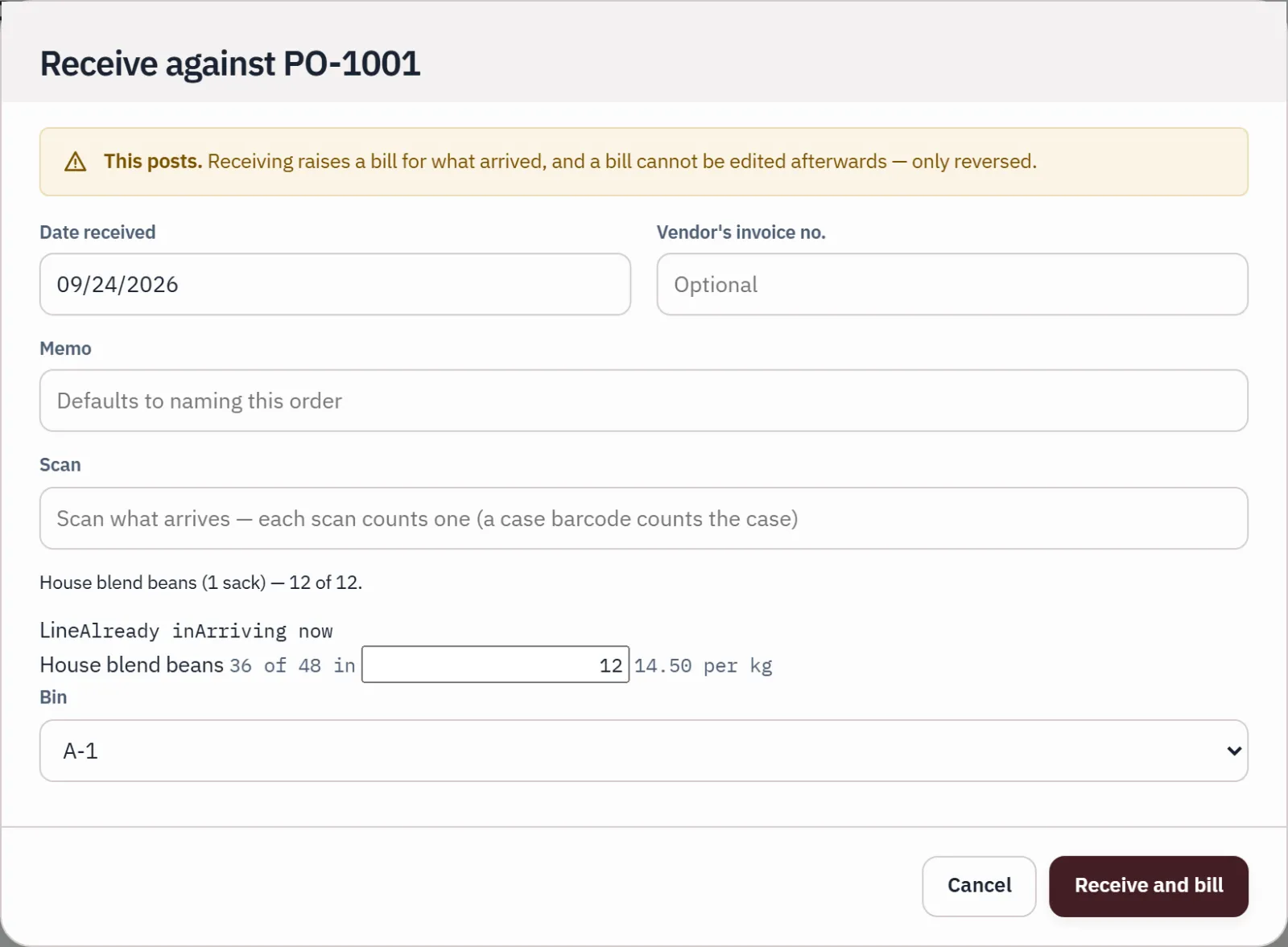
Order from the supplier with the site and bin each line should arrive in. When goods come in, receive what came, scanning a case barcode to count the whole case, with lot numbers where you track them. Receiving creates the supplier bill; part of an order can arrive now and the rest later.

  • A purchase order posts nothing on its own
  • The order shows what is still to come
  • Lots and expiry dates recorded on the way in
Run your stock
Receive
Receiving purchase order PO-1001: one scanned sack barcode counts 12 kg of beans arriving, and a banner says receiving creates the bill.
Sample company · synthetic figuresReceiving PO-1001: one scanned sack barcode counts 12 kg of beans, and receiving creates the bill.

Sell · Set aside and pick

Promise only what is really free

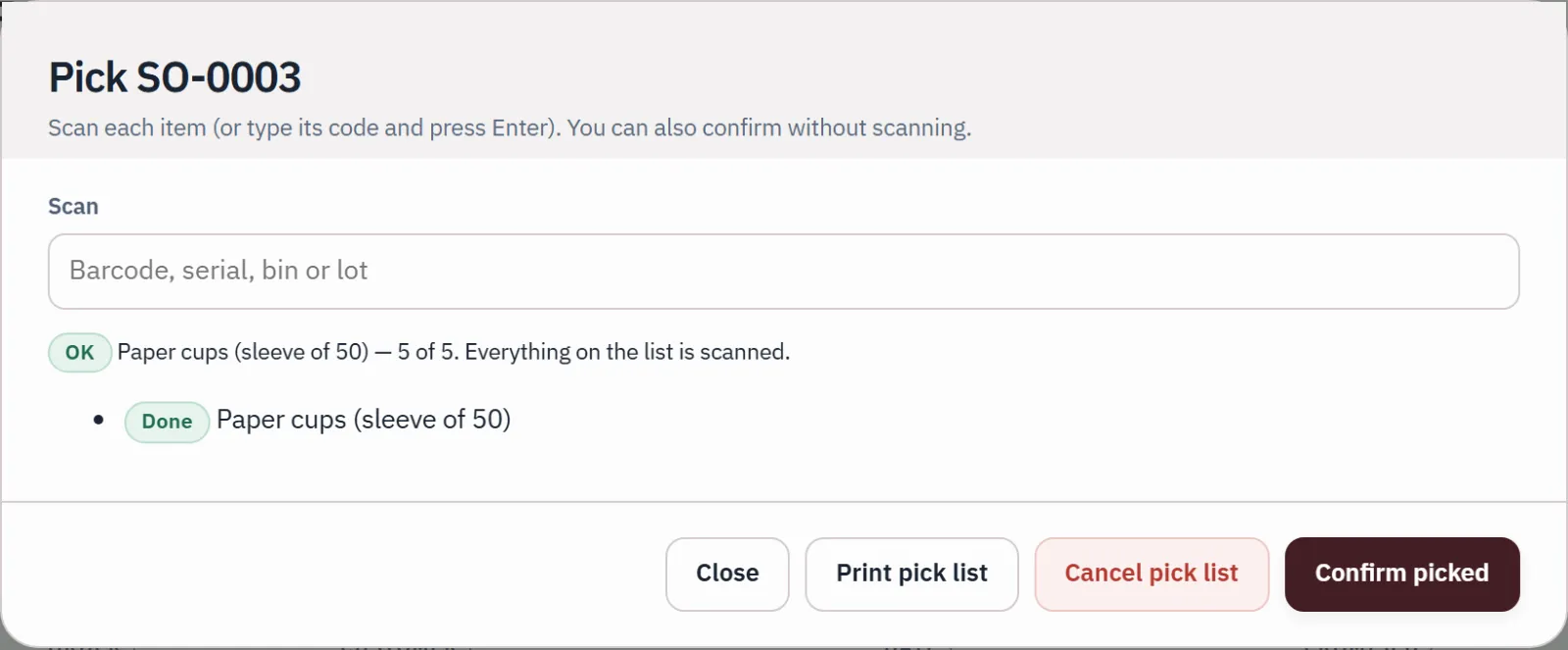
A sales order sets stock aside: it stays on the shelf but can't be promised to anyone else, and anything short shows as backordered. The pick list says which bin to take each item from; scan or tick what you pick.

Run your stock
Pick
Picking sales order SO-0003 by scanning: five sleeves of paper cups scanned, the line marked Done.
Sample company · synthetic figuresPicking SO-0003 by scanning: five sleeves of paper cups, the line marked Done.

Ship · Dispatch and invoice

The invoice is created as the goods leave

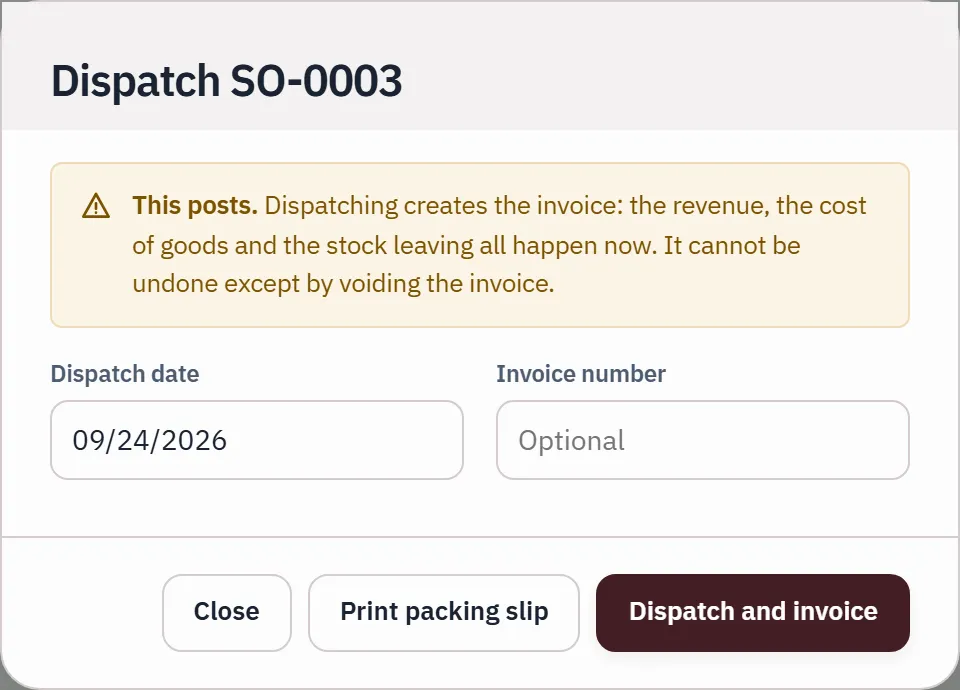
Pack the order, with a packing slip that shows no prices, then choose Dispatch and invoice. The stock and its cost leave once, at that moment, and part of an order can go now and the rest later.

  • Picking and packing post nothing
  • A dispatch can never be sent twice
  • Revenue, cost of goods and stock move together
Dispatch
Dispatching SO-0003: a banner says dispatch creates the invoice, and revenue, cost of goods and stock leaving all happen at that moment.
Sample company · synthetic figuresDispatching SO-0003: revenue, cost of goods and stock leaving all happen at dispatch.

Get paid · Terms and aging

Each customer on their terms, and who is late

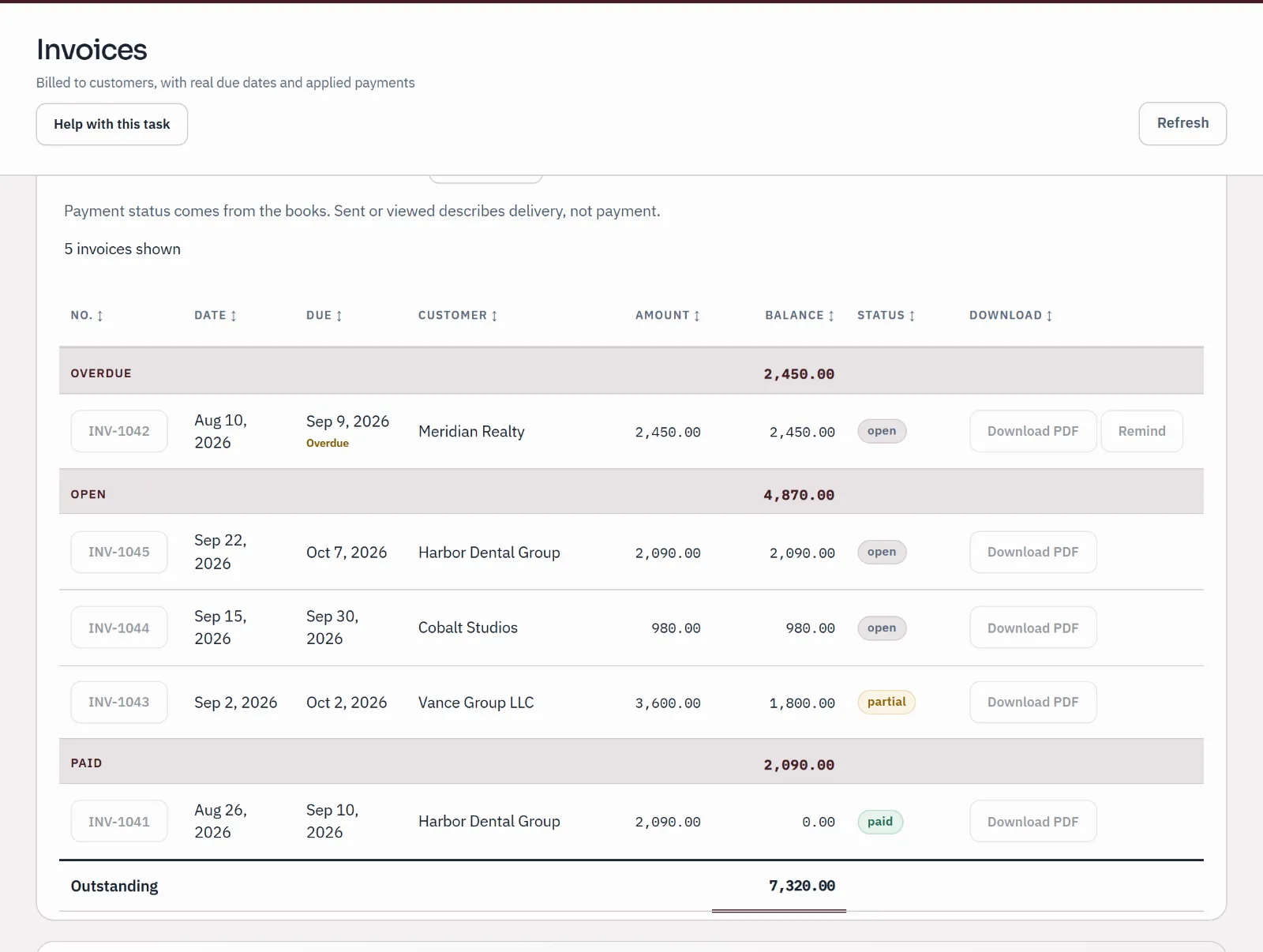
A customer's payment terms set the due date on their invoices. A/R aging shows who owes you and for how long, and each payment is recorded against the invoices it pays, in part or in full.

Receive a customer payment
Invoices
Sample invoices list: one overdue invoice, three open including one part-paid, and one paid, each with its amount and remaining balance.
Sample company · synthetic figuresOverdue, open, part-paid and paid invoices, each with the balance still due.

Month-end · Count and check

Count the warehouse, then check the value

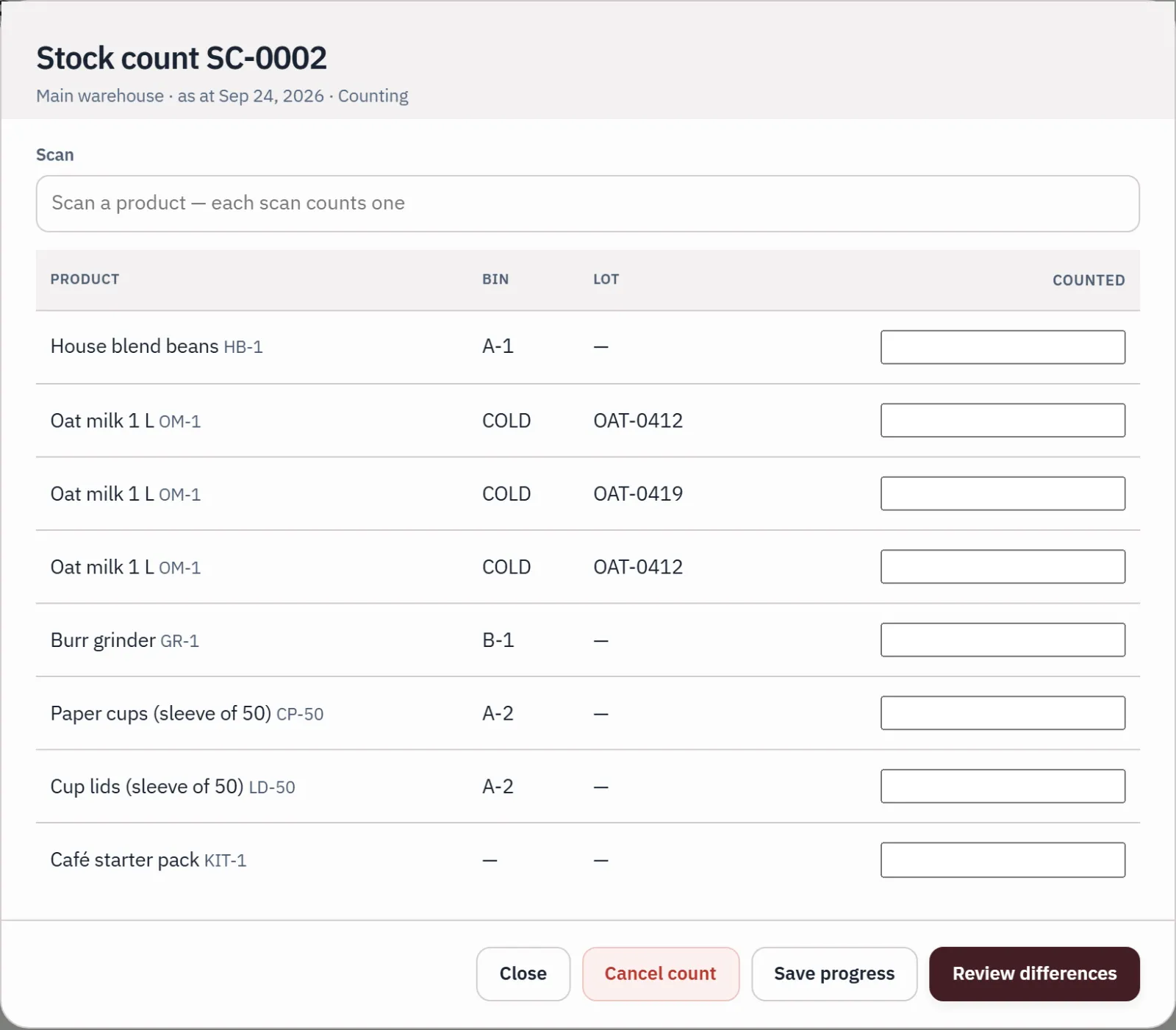
Run a blind count for a site, its bins or one category: counters see products, bins and lots, not what the books expect. Apply the differences as one entry, then check stock value against the Inventory account. Any difference is listed with its cause.

Count your stock
Stock count
A blind stock count sheet for the main warehouse: products, bins and lots with a counted column, and no expected figures shown to the counter.
Sample company · synthetic figuresA blind count sheet for the main warehouse: products, bins and lots, with no expected figures shown.

Also on the same screens

What a distributor reaches for every week.

  • Transfers between sites

    Move stock between warehouses. What is on the road shows until it arrives, and moving it never changes its value.

  • Reorder workbench

    Reorder points and order-up-to levels per site. It suggests what to order and drafts purchase orders; it never sends or posts anything itself.

  • Cases and units

    Count in each, in kg or by the case of 12. A case barcode counts the whole case when you receive.

  • Returns to suppliers

    Goods go back off the shelf, and their cost is held apart until the supplier's credit arrives.

  • Customer returns

    Linked to the invoice they were sold on, at the cost they left at, into quarantine if you want to inspect them.

  • Lots and serial numbers

    Trace a lot or a serial number from the supplier it came from to the customers who have it.

Before you move

What it doesn't do yet.

Qetaab is made for small and growing product businesses, not to replace every enterprise warehouse system. These are the edges a distributor asks about first.

  • Receiving before the bill

    Receiving creates the supplier bill, so the goods and what you owe for them arrive in the books together.

  • Shipping before the invoice

    Dispatch creates the customer invoice. There is no ship-now, invoice-later.

  • Freight and duty in stock cost

    A landed-cost preview shows how a charge would spread across a receipt. Posting it isn't available yet.

  • A warehouse-only sign-in

    People who pick and count use the usual team roles. A role that hides the accounts isn't available.

  • Carriers and shipping labels

    There is no carrier or shipping-label connection.

  • Barcode scanners

    Scanning accepts a scanner that types into the keyboard. It has been tested by typing, not yet with a physical scanner.

Pricing

The whole order-to-cash cycle, in every plan.

Inventory is included on every plan, Free too, with room for a second person to approve counts and for your accountant in the same books. Plus, at $10 a month, adds live bank feeds and AI.

  • Free Usually fits

    FreeNo card needed

    For a business owner, or an accountant and every client.

    Unlimited businesses and people. Your accountant included.

  • Plus

    $10 a monthor $100 a year

    Live bank feeds and AI for your business.

    Live bank accounts: 3 included. AI: 300 a month.

  • Practice

    $50 a monthor $500 a year

    Live bank feeds and AI across a practice and its clients.

    Live bank accounts: 25 included. AI: 3,000 a month.

Every limit and the payment terms

Paid checkout isn't open during the pilot.

Plain answers

What distributors ask before they switch.

Can I keep stock in more than one warehouse?

Yes. Add each site, with bins if you want them, and transfer stock between sites. Stock by place shows every product at every site, bin, lot and status.

Can I bring in the stock I already hold?

Yes. Import opening stock from a spreadsheet with a SKU, quantity and unit cost for each row, and the site, bin, lot, expiry date and serial numbers if you have them. It runs only when the file adds up to the control total you type in, and posts one entry.

Can a count wait for someone else to check it?

Yes. Counting posts nothing until the count is applied, and you can require a second person, who didn't do the count, to approve each one first. Approval needs shared books with each person signed in.

What if I later move to another accounting system?

The accounting-file export includes posted amounts and lists its compatibility limits. Sites, bins, lots, serial numbers, transfers, orders and counts don't travel in that file.