
Getting started
Set up your company
Your books carry the right company name, fiscal year, home currency and reporting basis before the first entry is posted.
- Who this is for
- Owner or admin of the books.
- Before you start
- You can open the company in Qetaab.
- You know the month your fiscal year begins and the currency you keep the books in.
- Availability
- Available in the hosted app and in the local build. Every plan, Free included, holds as many companies as you need.
Steps
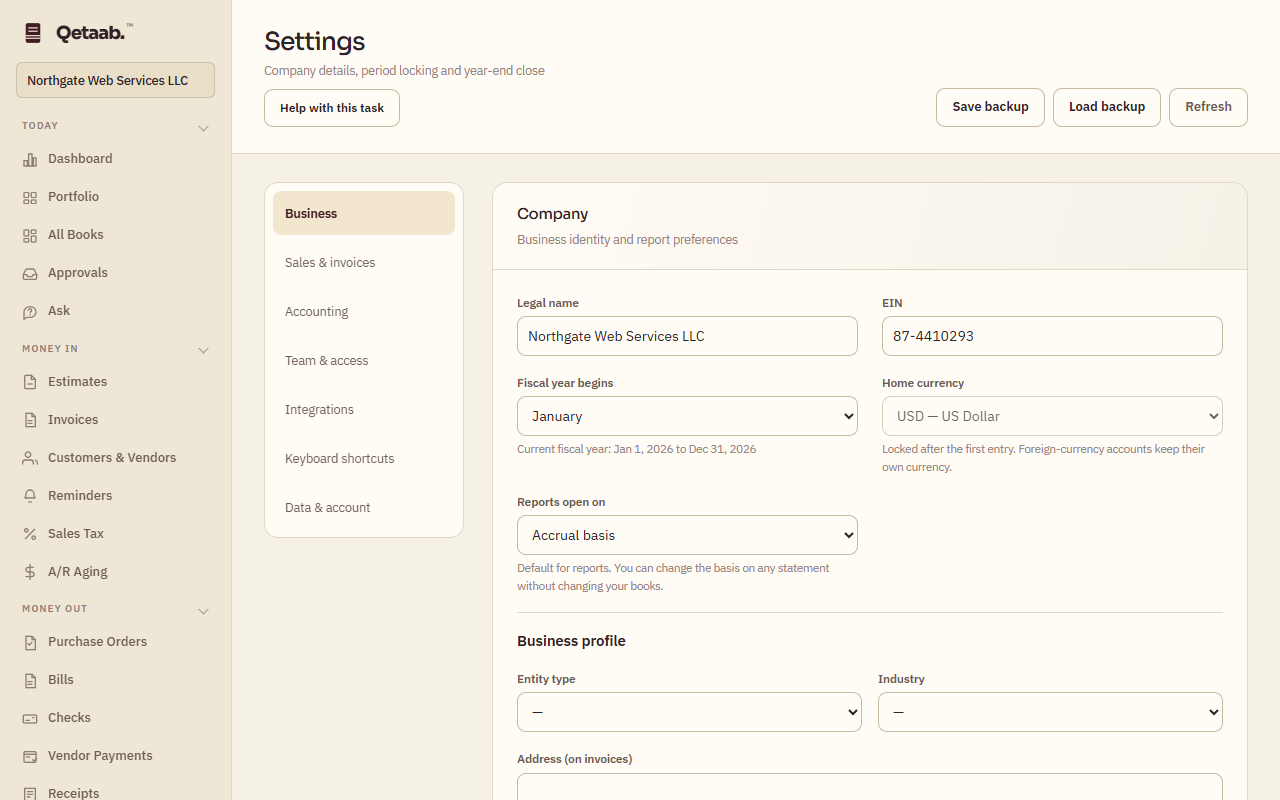
- Open Settings & Close (under Books) and stay on the Business section. The Company card holds the legal name, EIN, fiscal-year start, home currency and the basis reports open on.
- Fill in the Business profile below it — entity type, industry, the address that prints on invoices, phone, email and website — then choose Save company.
- Choose Run setup wizard if you would rather answer the same questions one screen at a time. The wizard also offers sales-tax rates and an opening chart of accounts.
- Add customers and vendors before you create invoices or bills, so each document can be tagged with the right name.
- Home currency locks the moment the first entry posts, so check it before you post anything. Fiscal year, basis and profile details can be changed later.
What you should see
The Company card shows the saved details and the current fiscal year dates. Reports open on the basis you chose.
If it goes wrong
If the Home currency selector is greyed out, an entry has already been posted and the currency is locked. Keep the books in that currency, or start a new company from + Add another company and import into it.
What it looks like
Related guides
Steps checked in the app on 2026-09-21. This guide describes how the software works; it is not accounting, tax or legal advice. Need a hand? Email support@qetaab.com.
All guides →